Designing a Clean Dental Care Social Media Post That Converts
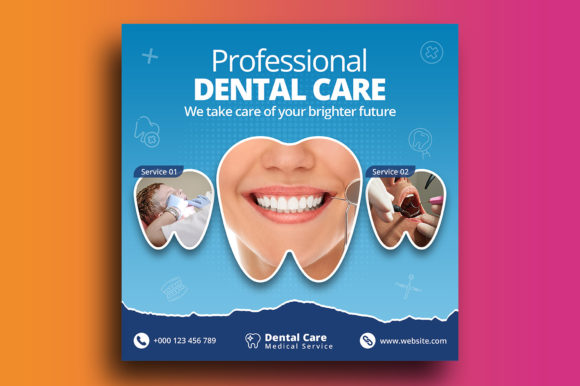
Let's be honest, most dental clinic social media feeds are a snooze. Blurry photos, inconsistent colors, and text that looks like it was added in Microsoft Paint. It doesn't exactly scream "trust me with your smile," does it? The difference between a feed that gets scrolled past and one that stops a thumb often comes down to one thing: a cohesive, professional visual template. A well-designed Dental Care Social Media Post isn't just about looking pretty; it's a silent ambassador for your practice's professionalism and attention to detail.
Beyond the Smile: Visual Consistency as Your Brand's Handshake
Imagine two competing dental offices. Office A posts a random mix of stock photos, mismatched fonts, and colors that change weekly. Office B uses a clean, consistent template for every post—appointment reminders, patient education, team spotlights, and special offers. Which one feels more organized and trustworthy? The answer is obvious. Consistency in your social media graphics is the visual equivalent of a firm handshake. It communicates stability and care. Using a dedicated template, like the one described with its 1080x1080 pixel canvas and optimized 300 DPI, ensures every post looks sharp on any screen. This isn't just about aesthetics; it's about building brand recognition. When your followers see that distinctive color palette and layout, they immediately know it's you before they even read a word. This consistency extends beyond Instagram—it should inform your website design, blog graphics, and even print materials like pamphlets or posters in your waiting room, creating a seamless brand experience.
Practical Applications: From Instagram to the Office Wall
The true power of a versatile design asset like this is its adaptability. Think of the PSD file as your creative starting point, not a rigid cage. Here’s how you can deploy it across your marketing ecosystem:
- Social Media Graphics: This is its home turf. Use it for consistent Instagram posts, Facebook updates, or LinkedIn announcements. The square format is perfect for most platform feeds.
- Branding & Logo Design: The template's color scheme and typography can directly inform your broader brand identity. Pull the hex codes and font styles to create a cohesive look for your logo and all ancillary marketing assets.
- Packaging & Merchandise: Design labels for dental care kits or promotional merchandise like branded toothbrushes or floss containers. The clean, professional aesthetic translates perfectly.
- Digital Products & Editorial Layouts: Create visually appealing PDF guides, e-books, or newsletter headers. The 300 DPI optimization means it's crisp for both screen and print.
- Invitations & Events: Promote open days, charity events, or patient appreciation days with stylish digital or printed invitations that match your clinic's vibe.
The key is to view the template as a system. By using it repeatedly, you train your audience's eye, making your content instantly recognizable in a crowded feed. This is the essence of effective visual communication.
Choosing Your Typographic Tone: More Than Just Letters
The included free font is a critical component of the template's appeal. But why does font choice matter so much for a dental practice? Typography carries personality. A sharp, modern sans serif font can convey efficiency and a contemporary feel. A classic serif font might evoke tradition and trust. A friendly, handwritten font could be used sparingly for a personal touch on a "Meet the Team" post. The goal is to match the font's personality to your practice's message and your target audience. A family-friendly practice might opt for something softer and more approachable, while a cosmetic dentistry clinic focused on high-end aesthetics might choose a sleek, minimalist typeface.
When editing the template, don't just change the words—consider the font's role. Is the headline font bold enough to grab attention? Is the body text readable at a glance? Test different font pairings within the template's style. The provided font likely has multiple weights (light, regular, bold) which is a huge advantage. Using bold for key messages and regular for supporting text creates visual hierarchy and improves readability, which is non-negotiable for conveying important information like phone numbers or website URLs.
From Template to Tailored: Making It Uniquely Yours
The description mentions this is "easy to edit" with just basic Photoshop knowledge. That's your cue to make it your own. The template is a professional foundation, but the magic happens in the customization. Start by swapping the placeholder image with high-quality, original photos of your team, your office, or happy patients (with their permission, of course). Authentic imagery builds far more connection than generic stock photos.
Next, infuse your brand's specific color palette. If your clinic's logo uses a calming teal and a clean white, update the template's colors to match. This single step will skyrocket your brand recognition. Then, refine the text. Don't just paste in a generic quote. Write captions that speak directly to your patients' concerns and desires—whether it's easing dental anxiety, explaining a new procedure, or celebrating a staff member's anniversary. The template handles the visual professionalism; you provide the authentic voice. This combination is what transforms a standard post into a powerful piece of content marketing that fosters engagement and builds a community around your practice.
Ultimately, investing time in a structured approach to your social media visuals pays dividends in perceived value and patient trust. It moves your practice from looking like an amateur operation to a polished, modern business that cares about every detail—from the dental work itself to how it presents itself to the world. A well-executed Dental Care Social Media Post template is more than just a pretty picture; it's a strategic tool for growth.