Barax Keynote Template: A Designer's Toolkit for 150+ Polished Slides
You’ve just been asked to put together a major presentation—maybe it's a brand pitch, a product launch deck, or a conference keynote. The content is solid, but the thought of starting from a blank slide in PowerPoint feels daunting. You want something professional, visually cohesive, and efficient, but sifting through thousands of generic templates is a time sink. What you need is a design system, not just a set of slides. This is where the Barax Keynote Template steps in, offering a structured yet flexible foundation for anyone serious about visual communication.
More Than Just Slides: A Visual System for Your Brand
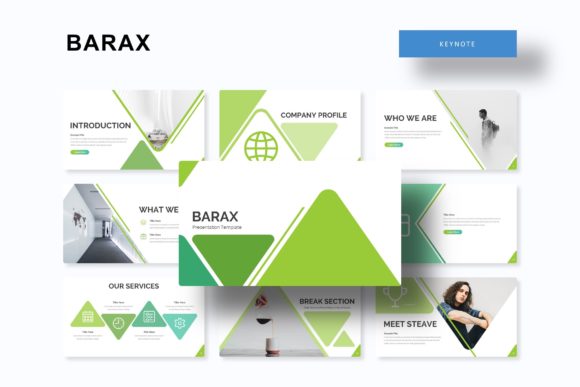
At its core, the Barax template isn't merely a collection of pretty backgrounds. It's a comprehensive presentation toolkit built on the principle of modern typography and design efficiency. With 150+ total slides, it provides a vast library of layouts for virtually any content need—text-heavy explanations, data visualization, image showcases, and process breakdowns. The real value lies in its systematic approach. Each of the five premade color themes includes 30 meticulously crafted slides, ensuring visual consistency from the first title slide to the final call-to-action. This kind of structured design asset is a game-changer for maintaining brand recognition across multiple presentations, saving you from the "Frankendeck" effect where every slide looks like it came from a different source.
For a small business owner or a marketing professional, this translates directly to time saved and a more polished image. Imagine preparing a quarterly review for stakeholders. Instead of wrestling with alignment and color codes, you simply select the Barax theme that matches your brand palette, and every slide—whether it's a handcrafted infographic or a section break—is already on-brand. The pixel-perfect illustrations and resizable, editable graphics mean you can customize without compromising quality, whether you're presenting on a laptop screen or a large conference display.
Practical Design Applications Beyond the Boardroom
While "Keynote Template" suggests a specific use, the assets within Barax have creative applications that extend far beyond a formal slide deck. Think of the individual slides as modular design components. A beautifully crafted portfolio slide can be repurposed as a webpage mockup in a pitch to a web design client. The infographic layouts are perfect for breaking down complex information for a blog post or a social media carousel. The clean, modern typography and ample picture placeholders make it straightforward to create compelling visuals for digital products, like e-book chapter pages or online course materials.
Consider a freelance graphic designer. They could use the Barax system to create a cohesive suite of materials for a client: the main presentation deck, then extract the gallery slides to build a simple portfolio PDF, and use the infographic sections to design supporting graphics for the client's social media launch. The drag-and-drop functionality based on master slides is crucial here—it ensures that any edit made to a logo or color scheme propagates throughout the entire project, maintaining that critical visual consistency. This is practical, real-world efficiency that lets creatives focus on strategy and storytelling rather than repetitive formatting.
Key Features That Drive Real Results
Let’s break down the specific features that make this template a robust piece of your design toolkit:
- Handcrafted Infographics: Data presented clearly builds credibility. These aren't generic chart templates; they are designed to make statistics and processes understandable and visually engaging, which is essential for everything from investor pitches to educational content.
- Section Break Slides: These provide clear visual pauses, helping to structure your narrative. Use them to introduce new topics in a webinar or to segment chapters in a digital lookbook.
- Gallery and Portfolio Slides: Showcase work with impact. For a photographer, artist, or crafter, these slides offer a clean frame that lets the work itself shine, perfect for client presentations or showcasing products.
- 5 Premade Color Themes: Starting with a pre-selected palette removes the guesswork of color theory. It’s a instant way to achieve a professional aesthetic and test which color variation best resonates with your audience or brand identity.
- Pixel-Perfect Illustrations: Crisp, scalable graphics ensure your presentation looks sharp on any screen, reinforcing a professional standard.
Remember, the included "Readme First" file and free font download link are there for a reason. Taking ten minutes to install the recommended typeface ensures everything renders exactly as the designer intended, preserving the intended hierarchy and readability. This attention to detail is what separates a good presentation from a great one.
Integrating Barax into Your Creative Workflow
Adopting a new design asset is most effective when it fits into your existing process. Start by selecting one of the five color themes that closest aligns with your current brand palette or project mood. Don’t feel pressured to use all 150+ slides; instead, build a master template with the core layouts you’ll use most often—title, content, two-column, and image-focused slides. This creates your personalized, efficient starting point.
When customizing, leverage the editable graphics. Swap in your own images using the drag-and-drop placeholders, and adjust the infographic colors to match your brand. For projects like packaging mockups or merchandise designs, you can isolate a single, striking slide layout—perhaps one with a bold headline and a central image placeholder—and use it as a composition guide in your design software. The versatility of a premium font and layout system like this lies in its adaptability. It’s not about being locked into one style, but about having a consistent, professional framework to build upon, whether you're creating a minimalist tech startup pitch or a vibrant, pattern-filled invitation suite.
Ultimately, tools like the Barax Keynote Template are about removing friction from the creative process. They provide a professional starting point that respects both your time and your need for quality, allowing you to focus on what truly matters: your message, your story, and your connection with the audience. By handling the heavy lifting of layout and consistency, it frees you up to think more deeply about content strategy and audience engagement, turning a routine task into an opportunity for polished, impactful communication.