Dolce Keynote Template: Your Go-To for Polished Presentations
We've all been there. You have a brilliant idea, a groundbreaking proposal, or a quarterly report that deserves attention, but staring at a blank slide deck feels paralyzing. You spend hours wrestling with alignment, color schemes, and trying to make generic charts look remotely professional. The result? A presentation that feels disjointed and fails to communicate the clarity and confidence of your actual message. This is where a thoughtfully designed asset becomes less of a luxury and more of a strategic tool. The Dolce Keynote Template is built for this exact scenario, offering a structured yet flexible foundation to transform your ideas into visually compelling narratives.
A Visual System Built for Clarity and Impact
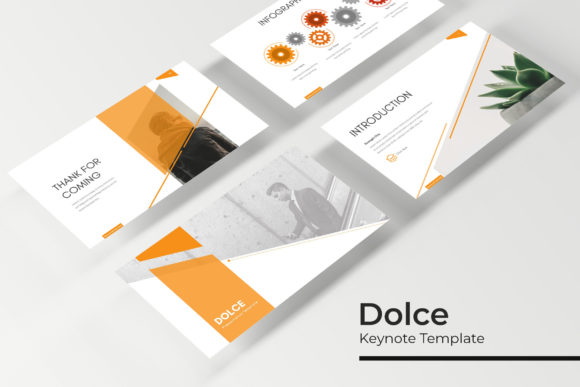
What sets this template apart isn't just that it looks good—it's how it's engineered for practical use. With over 150 total slides across five premade color variations, you're not getting a one-trick pony. You receive five complete presentation kits, each with 30 meticulously crafted slides. This variety is crucial because a startup's pitch deck has a different visual tone than an internal corporate strategy review or a creative portfolio showcase. The five color palettes provide an immediate foundation for brand alignment, allowing you to select the scheme that resonates most with your audience or your existing brand identity, saving you from the daunting task of building a palette from scratch.
The design philosophy here centers on modern typography and clean layout. The slides are built on master slides, a feature that might sound technical but is fundamentally about efficiency and consistency. When you edit the master, every single slide that uses it updates automatically. This means you can change a font, adjust a color, or modify a layout element once, and it ripples through your entire presentation. This single feature is a game-changer for maintaining visual consistency—a cornerstone of professional branding. You avoid the telltale signs of an amateur presentation: mismatched fonts, inconsistent spacing, and erratic color use. The result is a pixel-perfect, cohesive story from the first slide to the last.
Practical Tools for Real-World Scenarios
Beyond the foundational slides, the Dolce template includes handcrafted infographics and section break slides. Think about how you currently present data. A dense table of numbers can cause eyes to glaze over. The infographics here are designed to translate that data into digestible, engaging visuals—whether it's a process flow, a comparative chart, or a timeline. These aren't just decorative; they're communication tools that improve readability and audience engagement. Similarly, well-designed section breaks act as visual chapter markers, helping your audience follow the structure of your argument or story without you having to verbally announce each transition.
For those in creative fields, the gallery and portfolio slides are particularly valuable. If you're a designer, photographer, architect, or any visual professional, how you present your work is part of your brand. These slides provide elegant frames for your projects, using picture placeholders that are both resizable and editable. The drag-and-drop functionality, based on the master slide structure, means you can insert your images seamlessly without worrying about distorting layouts or breaking the design's integrity. It ensures your work remains the star, presented in a clean, professional context that elevates its perceived value.
Integrating Dolce Into Your Creative Workflow
The true test of any design asset is how it fits into your existing workflow. This template is designed as a starting point, not a rigid cage. The included PPTX files are fully customizable. You can change colors, swap fonts (the readme file includes links to the free fonts used), and rearrange elements to suit your specific needs. This flexibility makes it a powerful component in a larger brand identity system. You might use the color schemes as a starting point for your marketing materials or adapt the infographic styles for your social media graphics or blog posts, creating a subtle yet powerful thread of visual consistency across all your touchpoints.
Consider the practical applications beyond a standard slide deck. A marketing professional could use these slides to craft a visually engaging campaign brief for a client. A small business owner might adapt them to create a compelling investor pitch or a training manual for new hires. A content creator could repurpose the layouts for webinar slides or even dynamic PDF guides. The underlying principle is using professional design assets to save time while simultaneously elevating the quality of your output. It allows you to focus your energy on the substance of your message, confident that the visual presentation will support and enhance it, rather than distract from it.
Making the Most of Your Presentation Toolkit
When you download the Dolce Keynote Template, you receive five PPTX files—each corresponding to a color theme—in both standard and widescreen formats. This attention to detail acknowledges that presentations are viewed in different contexts, from projectors in a boardroom to laptops in a coffee shop. The readme file is an important first step, guiding you on font installation so your slides render exactly as intended. Remember, while the template provides the structure, the photographs and pictures used in previews are for illustration only; you will insert your own content. This is where you infuse the template with your unique brand assets, your team photos, and your product images.
Ultimately, the goal is to communicate more effectively. A well-structured, visually harmonious presentation does more than just look pretty; it builds credibility, aids comprehension, and holds attention. By starting with a robust framework like this one, you bypass the initial friction of design and move directly to crafting your message. It's about working smarter, using curated design elements to ensure your big ideas are presented with the polish and professionalism they deserve. Whether you're pitching a new venture, sharing quarterly results, or teaching a concept, having a reliable, adaptable visual toolkit can make the difference between a message that lands and one that gets lost in the noise.