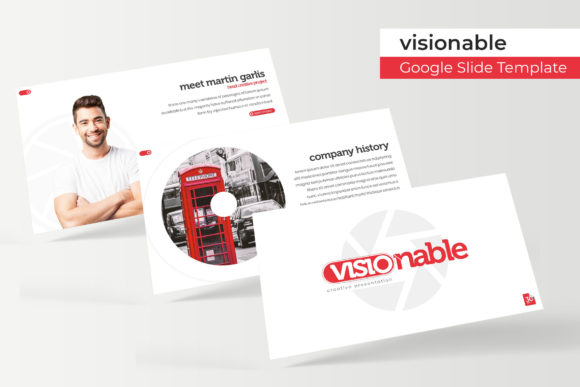
Visionable Google Slide Template: Your Go-To for Polished Presentations
You know that moment when you open a blank presentation file and the cursor just blinks at you, daring you to create something professional from scratch? It’s a time-sink most of us can’t afford. That’s where a well-structured template comes in, not just as a starting point, but as a complete visual system. The Visionable Google Slide Template is designed to be that system, offering a robust foundation for anyone who needs to communicate ideas clearly and beautifully, whether you're pitching a new client, outlining a marketing strategy, or teaching a workshop.
A Complete Visual Toolkit, Not Just a Pretty Face
What sets this particular template apart is its sheer volume and thoughtful organization. With over 150 total slides, it’s less of a single template and more of a comprehensive library. The structure is built on five premade color variations, each containing 30 distinct slides. This means you’re not just getting one look; you’re getting five cohesive visual identities to choose from right out of the box. The color palettes are modern and versatile, designed to work across different industries—from a sleek tech startup pitch to a warm, organic wellness brand presentation.
The slides themselves are handcrafted with pixel-perfect illustrations and infographics. This isn’t about generic clip art. Every chart, diagram, and icon is integrated into the design system, ensuring that when you visualize data or explain a process, it looks intentional and professional. The inclusion of dedicated section break slides helps you structure your narrative, guiding your audience through your story without visual jarring. For creatives and marketers, the gallery and portfolio slides are invaluable. They provide clean, grid-based layouts to showcase work, products, or case studies with impact, using picture placeholders that make inserting your own images as simple as a drag-and-drop.
Practical Applications Across Your Projects
The real value of a template like this is its flexibility. It’s a design asset that can streamline your workflow across multiple touchpoints. For small business owners and entrepreneurs, it’s the foundation for a consistent brand identity. Use it to create everything from investor decks and team training manuals to client proposals and internal reports. The cohesive look across all these documents builds brand recognition and projects a level of professionalism that can be a key differentiator.
For content creators and marketers, the template becomes a powerhouse for visual communication. Imagine developing a series of social media graphics for a campaign—the color themes and typography styles from the slides can be adapted into Instagram carousels or LinkedIn infographics. The same visual language can inform your website’s presentation pages, blog post graphics, or even the design of digital products like e-books or online course materials. The consistency achieved by using a unified template across your marketing assets—from the initial pitch to the final social media post—significantly strengthens your overall brand narrative.
Even for personal projects, the structure is a lifesaver. Planning a community event? Use the template to create a clear, engaging itinerary and sponsor presentation. Working on a personal portfolio or a passion project blog? The gallery layouts provide an elegant way to display your work. The key is that the heavy lifting of design is already done, allowing you to focus on your content and message.
Designed for Real-World Use and Customization
One of the biggest frustrations with many design assets is the lack of flexibility. A beautiful template becomes useless if you can’t adapt it to your needs. The Visionable template is built with practicality at its core. Every element is resizable and editable. The graphics are not locked; you can change colors, adjust shapes, and modify text to fit your specific brand guidelines. The layout is based on master slides, which means you can make global changes to fonts, colors, or footer information in one place, and it will update throughout the entire presentation. This saves an enormous amount of time and ensures consistency.
The use of free, accessible fonts is another practical consideration. You’re not left scrambling to purchase expensive commercial licenses before you can even use the template. The included readme file provides direct download links, so you can get up and running immediately. This thoughtful inclusion removes a common barrier for small businesses and independent creators who are mindful of their budgets.
Making the Most of Your Template: A Few Tips
To truly leverage a tool like this, think beyond the immediate presentation. When you customize the color palette, save those exact hex codes. That vibrant blue or warm earth tone you choose could become the cornerstone of your entire brand identity, used in your logo, website, and print materials. Let the typography choices guide your other design decisions. The font pairings suggested within the template are tested for readability and visual harmony; consider using similar pairings in your other documents for a unified feel.
Before diving in, take thirty minutes to simply browse all 150+ slides. You might discover a unique data visualization style or a section break layout you hadn’t considered that could solve a specific problem you’re facing. Because the graphics are editable, don’t be afraid to deconstruct an infographic and repurpose its elements for a social media post or a website banner. The goal is to use the template as a springboard for creativity, not a rigid cage.
Ultimately, a great presentation template does more than make slides look good. It clarifies your message, saves you valuable time, and provides a professional framework that lets your ideas shine. It’s about having a reliable system that you can return to, project after project, knowing the result will be polished, consistent, and effective. Whether you’re building a brand from the ground up or refining an existing one, having a versatile and robust design asset in your toolkit is a strategic advantage.