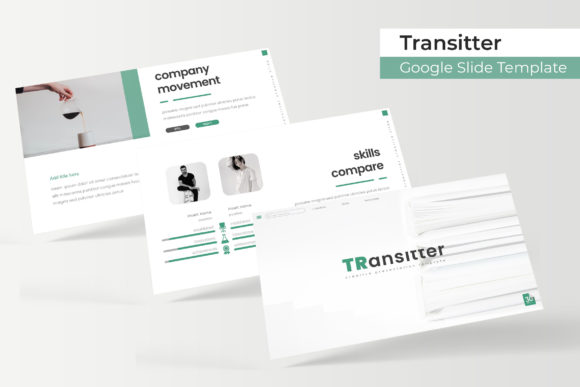
Master Your Next Pitch with the Transitter Google Slide Template
You’ve spent hours perfecting your business strategy, your marketing plan, or your creative portfolio. You know your content is solid, but there is a lingering doubt about the delivery. We have all been there—staring at a default blank slide deck, trying to force generic layouts to fit a sophisticated message. The gap between a good idea and a great presentation often comes down to visual consistency. This is where a robust design asset like the Transitter Google Slide Template changes the game. It is not just about making slides look "pretty"; it is about establishing a professional standard that commands attention from the first click to the final Q&A.
Visual Appeal and The Power of 150+ Slides
What immediately stands out about the Transitter template is the sheer volume of options available. With over 150 total slides included, you are not just buying a single presentation; you are investing in a comprehensive design system. The visual style leans into modern typography and clean aesthetics, ensuring that your message remains the hero of the presentation. For small business owners and content creators, this variety is crucial. It prevents the "cookie-cutter" look that plagues so many corporate decks. Whether you are presenting quarterly financials or launching a new product, having access to handcrafted infographics allows you to translate complex data into digestible, engaging visuals.
The template comes with five premade color schemes, offering 30 distinct slides for each variation. This structure is incredibly helpful for brand identity work. If your brand colors don't match the default palette, you don't have to waste time manually editing every shape and text box. Instead, you can select the variation that closest matches your brand guidelines or use the master slides to apply your specific hex codes globally. This level of customization ensures visual consistency across your entire presentation, which is a key factor in building trust with your audience.
Practical Applications for Modern Professionals
The versatility of the Transitter Google Slide Template extends far beyond standard boardroom meetings. For graphic designers and creative agencies, the "Gallery and Portfolio" slides are indispensable. They provide a structured yet visually dynamic way to showcase previous work without cluttering the page. When pitching to a potential client, the way you present your past successes is just as important as the proposal itself. These layouts allow your work to breathe, utilizing high-quality picture placeholders that you can drag and drop your images into.
For those in marketing and social media management, this template serves as a foundation for creating cohesive digital products. You can repurpose the slides into downloadable lead magnets, webinar decks, or even visual blog post summaries. The pixel-perfect illustrations included in the package add a layer of polish that generic stock photos simply cannot match. Imagine presenting a marketing strategy to a stakeholder; using a handcrafted infographic to map out the customer journey demonstrates a level of professionalism and attention to detail that builds immediate credibility.
Entrepreneurs and startup founders will find the Section Break Slides particularly useful. In a fast-paced pitch deck, you need clear visual cues to signal a shift in topic. These dedicated break slides provide a moment for the audience to reset their focus while reinforcing the overall design language of the deck. It is a subtle design choice, but it significantly improves the flow of information and keeps the audience engaged throughout the presentation.
Seamless Workflow and Customization
One of the biggest hurdles in design is the technical barrier. The Transitter template is built on Master Slides, which is the industry standard for efficient design workflows. This means that if you want to change a font style, update a logo, or adjust a background element, you can do so in one central location, and the changes will ripple across the entire deck. For those who may not consider themselves design experts, this feature is a lifesaver. It ensures that your final product looks professional, even if you only have basic editing skills.
The inclusion of resizable and editable graphic picture placeholders is another practical feature that streamlines the creative process. You don’t need to be a Photoshop wizard to integrate your own imagery. The drag-and-drop functionality allows you to focus on the content rather than wrestling with alignment and sizing. Furthermore, the package includes 5 PPTX files, both standard and widescreen formats, ensuring that your presentation looks crisp whether it is displayed on an old projector or a modern widescreen monitor. The developers have also included a "Readme First" guide and links to download free fonts, removing any guesswork regarding typography and ensuring you can get started immediately.
Strategic Branding and Typography Considerations
Typography is often the silent hero of visual communication. The fonts used in the Transitter template are chosen to balance readability with aesthetic appeal. When you are designing for a diverse audience—ranging from investors to potential customers—you need a typeface that is legible at a distance and easy on the eyes during long reads. The template’s design encourages a hierarchy of information, using font size and weight to guide the viewer's eye to the most critical points.
For brand strategists, this template offers a playground for testing visual identities. Before committing to a full rebrand, you can use these slides to mock up how your new logo, color palette, and messaging look in a real-world context. It allows you to present a cohesive brand story, where the visual elements support the narrative rather than distract from it. Whether you are creating internal training materials or external marketing assets, maintaining a consistent visual language is paramount. The Transitter template provides the structure needed to enforce that consistency effortlessly.
Ultimately, the goal of any presentation is to persuade, inform, or inspire. By utilizing a premium design asset like the Transitter Google Slide Template, you remove the friction between your ideas and their visual execution. It allows you to focus on what you do best—running your business, creating content, or designing for clients—while trusting that the framework supporting your message is robust, professional, and visually compelling.