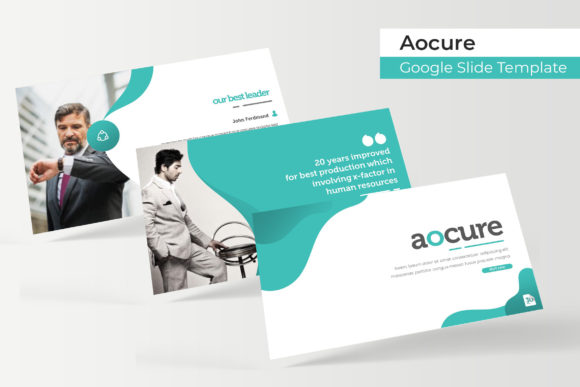
Transform Your Presentations with Aocure Google Slide Template
You know that feeling when you open a blank presentation and the cursor just blinks back at you? We’ve all been there. Whether you’re pitching a new client, sharing quarterly results, or teaching a workshop, starting from scratch is a drain on time and creativity. That’s where a thoughtfully designed template like Aocure comes in—it gives you a polished foundation so you can focus on your message instead of wrestling with layouts.
Aocure is a Google Slide Template designed for people who need presentations that look professional without spending hours formatting. With 150+ total slides, it offers enough variety to handle different types of content while maintaining visual cohesion. The template comes in five premade color schemes, each containing 30 slides tailored to that palette. This means you can switch between color themes depending on the project or client, all while keeping a consistent style.
Designed for Real-World Presentations
What makes Aocure stand out isn’t just the number of slides—it’s how those slides are built. Each one features handcrafted infographics, section break slides, and gallery layouts that feel intentional rather than generic. The graphics are pixel-perfect and fully resizable, so you can adjust them to fit your content without losing quality. Picture placeholders are drag-and-drop ready, which simplifies the process of adding your own images. You won’t need advanced design skills to make these slides look like they were made just for your project.
If you’ve ever struggled with aligning elements or matching colors across a presentation, you’ll appreciate that Aocure is based on master slides. This means changes to fonts, colors, or layouts can be applied globally, saving you from editing each slide individually. For small business owners or marketers who juggle multiple tasks, that kind of efficiency matters.
Practical Uses Beyond the Boardroom
While Aocure works beautifully for corporate presentations, its versatility extends to many other areas. Think about your brand identity—using a consistent template across all visual materials helps reinforce recognition. Aocure’s clean, modern typography and structured layouts can be adapted for social media graphics, digital product mockups, or even print materials like posters and brochures.
Content creators and bloggers can use these slides to design cohesive visual stories for their audiences. Imagine turning a blog post into a slide deck for LinkedIn or creating a portfolio showcase for potential clients. The template’s gallery and portfolio slides are particularly useful here, allowing you to display work in a way that feels organized and visually appealing.
For entrepreneurs putting together pitch decks or marketing assets, having a polished presentation can make a real difference. Aocure’s design helps convey professionalism, which builds trust with investors, partners, or customers. It’s not just about looking good—it’s about communicating clearly and effectively.
Getting the Most Out of the Template
One thing to keep in mind is that Aocure includes five PPTX files—both standard and widescreen formats—along with a readme file that details the free fonts used. While the preview images show photographs and illustrations for context, those aren’t included in the download. This is common with templates, as it keeps the file size manageable and lets you use your own imagery.
When you start customizing, think about your audience and goals. If you’re creating a presentation for a formal business setting, stick with the more neutral color variations. For creative projects or social media content, you might experiment with bolder themes. Test different slide layouts to see which ones best highlight your key points. Sometimes a simple infographic works better than a text-heavy slide, even if you have a lot to say.
Also, consider how the template’s typography affects readability. Aocure uses clean, modern fonts that work well on screen, but if you’re presenting in a large room or sharing slides digitally, make sure text sizes are appropriate. The template’s structure is designed to guide the viewer’s eye, so follow that flow when adding your content.
Why a Cohesive Visual System Matters
Consistency is key in any visual communication. When your slides, social media posts, and marketing materials share a common design language, your brand feels more reliable and recognizable. Aocure helps achieve that by providing a unified set of layouts and color options. You can use the same template for different purposes—internal reports, client presentations, webinar slides—without losing that cohesive look.
This kind of visual consistency also saves time. Instead of designing each presentation from the ground up, you have a ready-made system that adapts to various needs. For freelancers or small teams, that efficiency can free up hours for other important work.
Ultimately, a good presentation template is a tool that supports your communication goals. Aocure Google Slide Template is designed to be that tool—practical, adaptable, and visually polished. Whether you’re sharing data, telling a story, or showcasing your work, it gives you a strong starting point so you can focus on what really matters: your message.