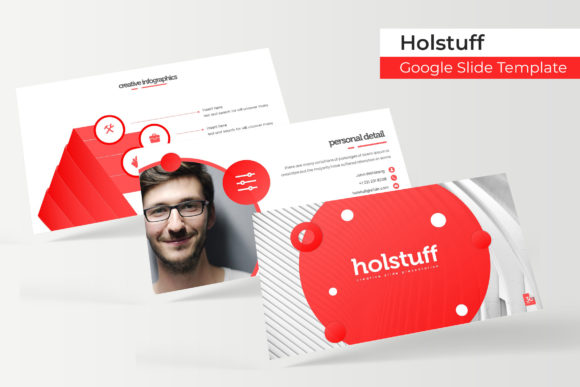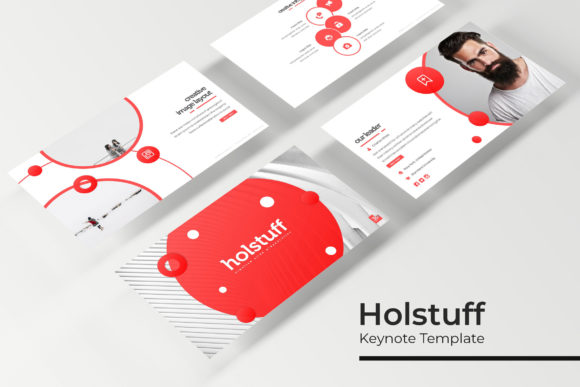
Transform Your Presentations with the Holstuff Keynote Template
Staring at a blank slide, cursor blinking, while you try to conjure a presentation that’s both professional and visually engaging is a common frustration. You need more than just text on a screen; you need a cohesive story, compelling data visualization, and a design that holds your audience’s attention. This is where a thoughtfully crafted asset like the Holstuff Keynote Template shifts from a nice-to-have to a genuine productivity tool. It’s designed to eliminate the starting-from-scratch anxiety and provide a robust foundation for any message you need to convey.
A Foundation of Flexibility and Polish
At its core, the Holstuff Keynote Template is a comprehensive design system. With 150+ total slides organized into five distinct premade color themes, it offers serious variety without sacrificing cohesion. Each of the five color variations contains 30 meticulously designed slides, giving you a complete visual language for a brand, project, or pitch. This structure is incredibly practical. Imagine you’re a marketing professional preparing a quarterly review; you can choose the color scheme that aligns with your company’s branding or the specific campaign you’re highlighting. The consistent design across all slides within a theme ensures your presentation looks polished and intentional from the first title slide to the final Q&A.
The real strength lies in the balance between pre-designed structure and customizable elements. Features like pixel-perfect illustrations and handcrafted infographics are built directly into the master slides. This means the complex charts and diagrams you need aren’t just static images; they are fully editable vectors. You can adjust colors, resize elements, and modify data points to reflect your exact information, ensuring accuracy and relevance. The drag-and-drop picture placeholder functionality is another subtle but powerful time-saver. Instead of wrestling with image cropping and alignment, you simply drag your photo into the designated area, and it fits perfectly, maintaining the slide’s clean, professional layout.
Practical Applications for Modern Professionals
Think beyond the boardroom. While perfect for investor pitches and client reports, the utility of a versatile presentation template extends into numerous creative and business domains. For a small business owner or entrepreneur, these slides are a ready-made toolkit for creating:
- Brand Guidelines: Use the typography and color scheme slides to visually outline your brand identity for freelancers or new team members.
- Sales Pitches & Proposals: Structure your value proposition, showcase testimonials, and present pricing packages in a clear, persuasive format.
- Workshop & Course Materials: Develop engaging educational content with section breaks, portfolio slides to display student work, and gallery slides for visual examples.
- Social Media Content Plans: Map out a content calendar visually, using the template’s graphics to plan Instagram carousels or video storyboards.
For designers and content creators, the template acts as a springboard for editorial design and digital product creation. The clean, modern typography and layout options are ideal for designing lookbooks, digital media kits, or even the visual framework for an online course. The included section break slides are particularly useful for segmenting long-form content, making it easier for your audience to follow along. The gallery and portfolio slides offer a elegant way to present case studies, photography projects, or design work, transforming a simple presentation into a compelling visual narrative.
Enhancing Communication and Brand Recognition
Visual consistency is the silent ambassador of your brand. Using the Holstuff Keynote Template helps enforce this consistency across all your presentation materials. When every slide shares the same design DNA—cohesive color palettes, consistent iconography, and uniform typography—it builds subconscious trust and recognition with your audience. They aren’t distracted by jarring visual shifts; instead, they focus on your message.
This consistency directly impacts readability and professional presentation. The template’s layouts are designed with clear hierarchies, guiding the viewer’s eye from the most important headline down to supporting details. The use of white space, a key feature of modern design, prevents cognitive overload and makes even complex information feel accessible. When your slides are easy to parse, your audience stays engaged longer, and your key points land with greater impact. It’s not about making things pretty for the sake of it; it’s about using visual design as a tool for clearer communication.
Getting the Most from Your Design Assets
To leverage a resource like this effectively, start with a clear objective. What is the single most important thing your audience should take away? Let that goal inform your choice of the five color themes and which slides you prioritize. A financial report might benefit from a more subdued, corporate color scheme, while a creative agency pitch could use a bolder, more vibrant variation.
Don’t treat the slides as rigid molds. The included Readme First document and master slide functionality are your guides to customization. Experiment with the editable infographics to make data uniquely yours. Swap out the placeholder graphics with your own high-quality photography or illustrations to add a personal touch. Test different font pairings if the included typefaces don’t quite match your brand’s voice—though the template provides a strong starting point. Always preview your presentation in presenter mode to check for timing, flow, and readability on a projected screen.
Finally, remember that the photographs used in the preview files are for illustration only and are not included. This is a common practice with design assets. It encourages you to source imagery that is authentic to your brand, story, and subject matter, which ultimately leads to a more genuine and effective final presentation. The true value of the Holstuff Keynote Template isn’t in providing all the answers, but in giving you a professional, adaptable framework to build upon, saving you hours of design work and letting you focus on what matters most: your content and your audience.