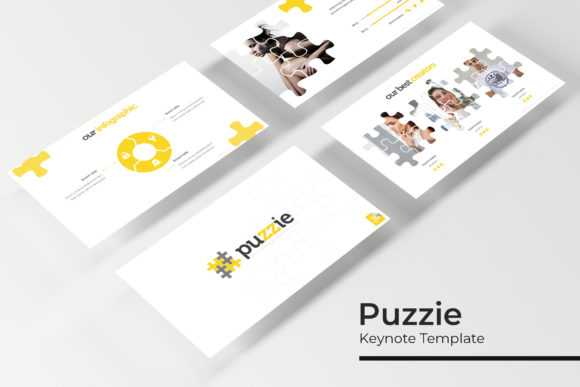
Transform Your Presentations with the Puzzie Power Point Template
Have you ever sat through a presentation that felt disjointed, where the visuals competed for attention instead of supporting the message? Or perhaps you've spent hours trying to make a standard template look unique, only to end up with a generic result. The struggle to create visually cohesive, professional, and engaging presentations is real for entrepreneurs, marketers, and creatives alike. This is where a thoughtfully designed resource like the Puzzie Power Point Template comes into play, offering a structured yet flexible foundation for your ideas.
A Foundation Built for Clarity and Impact
At its core, the Puzzie template is more than just a collection of slides. It's a design system built on master slides, which means every element, from text boxes to charts, is connected to a central source. This ensures pixel-perfect consistency across all 150+ slides. If you change the color scheme in one place, it updates everywhere. This foundational approach saves countless hours and eliminates the small inconsistencies that can undermine a brand's professional image.
The true appeal lies in its visual versatility. With five premade color palettes, you receive 30 distinct slides for each theme, totaling 150 ready-to-use layouts. Whether your brand identity is bold and energetic or calm and minimalist, there's a color variation to match. The handcrafted infographics are particularly noteworthy. Instead of generic clip art, these are custom illustrations designed to present data and concepts in a clear, engaging manner, helping your audience grasp complex information quickly.
Practical Applications for Modern Brands and Creators
The utility of a robust presentation template extends far beyond quarterly business reviews. Consider a small business owner preparing a pitch for potential investors. Using the Puzzie Power Point Template, they can build a narrative with dedicated section break slides to guide the audience through their story, market analysis, and financial projections. The gallery and portfolio slides become invaluable for showcasing past work, client testimonials, or product mockups with a clean, professional layout.
For content creators and marketers, the template is a powerhouse for creating consistent marketing assets. Imagine developing a series of social media graphics for a new product launch. Using the same color palette and typography from your presentation deck, you can create Instagram carousels, Pinterest pins, and Facebook ads that are instantly recognizable as part of the same campaign. This reinforces brand recognition across all touchpoints. The resizable and editable graphics mean you can adapt a single infographic from a slide into a standalone blog header or a print poster without losing quality.
The drag-and-drop picture placeholder feature is a game-changer for efficiency. Instead of manually resizing and cropping images, you simply drag your photograph into the designated area, and it fits perfectly. This is ideal for creating lookbooks, digital catalogs, or workshop materials where imagery is central. Teachers, coaches, and workshop facilitators can use the template to develop professional course materials, ensuring their educational content is as polished as their expertise.
Integrating Typography for Cohesive Branding
A presentation template's power is fully realized when paired with the right typography. The Puzzie template includes a readme file with links to download the free fonts used in the design. This is a critical detail. Using the intended fonts ensures the visual consistency and readability the designers planned for. The right typeface—whether a clean sans serif font for body text or a distinctive display font for headlines—can dramatically affect how your message is perceived.
When customizing, consider the personality of your brand. A creative agency might pair the template's modern layouts with a script font for accent text to add a human touch. A tech startup might stick with the provided modern typography to emphasize innovation and clarity. The key is to test font pairings within the template's framework. Does the chosen typeface complement the infographic illustrations? Does it maintain readability at various sizes on different screens? Always preview your slides in presentation mode to check for visual harmony.
Beyond the Slide Deck: A Versatile Design Asset
Think of the Puzzie template not as a single-use file, but as a library of design assets. The individual elements—the infographics, the portfolio grids, the section dividers—can be exported and repurposed. A graphic designer could use an infographic element from a slide to explain a process on a client's website. An entrepreneur could adapt the gallery layout to create a printable lookbook for a trade show. The pixel-perfect illustrations ensure that these elements look sharp whether viewed on a high-resolution screen or in print.
This adaptability makes it a valuable investment for anyone who regularly communicates ideas visually. From developing editorial layouts for a digital magazine to creating packaging design mockups, the structured yet flexible nature of the template provides a professional starting point. It allows you to focus on your content and message, rather than getting bogged down in the technicalities of slide design.
Maximizing Your Template: A Few Final Thoughts
To get the most out of this resource, start by reviewing the readme file to install the recommended fonts. This ensures your design matches the preview from the outset. Next, choose the color palette that best aligns with your existing brand identity. If none are a perfect match, use the master slide feature to create your own custom palette, which will then cascade across all slides.
Remember, the photographs used in the preview are for illustration only and are not included. This is an opportunity to inject your own brand's personality. Use your own high-quality images, or source compelling stock photos that reflect your story. The picture placeholders are designed to make this process seamless.
Finally, consider the commercial licensing of any assets you use. While the template itself is licensed for your projects, always verify that any fonts, images, or icons you incorporate are cleared for your intended use, whether for a client project, a digital product, or internal communications. This due diligence protects your work and ensures professional integrity.
The Puzzie Power Point Template is ultimately about removing barriers. It provides the sophisticated structure and visual polish that often require a designer's expertise, putting the power of consistent, professional presentation into the hands of anyone with a message to share. By leveraging its thoughtful features, you can transform how your audience perceives your ideas, your brand, and your professionalism.