Lookabo Keynote Template: Crafting Polished, Professional Presentations
There’s a moment in every presentation where the audience either leans in or checks their phone. It usually happens around slide five, when the initial excitement fades and the content settles into its rhythm. That’s precisely when a well-designed template earns its keep—when visual consistency and thoughtful design keep eyes on the screen instead of the exit sign. The Lookabo Keynote Template understands this moment, and it’s built to carry your ideas through that critical middle stretch with style intact.
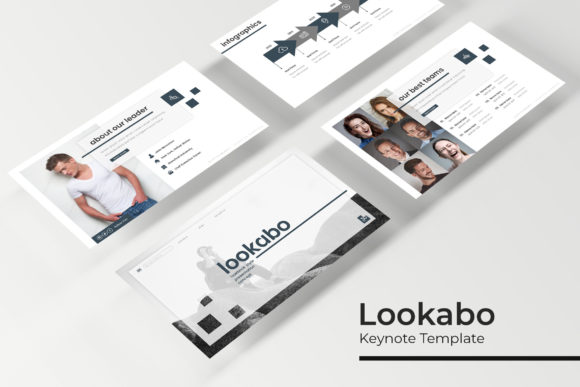
What strikes you first about this template isn’t just the aesthetic appeal, though that’s certainly there. It’s the sheer volume of thought baked into every element. With over 150 total slides spread across five premade color variations, you’re not just getting a handful of layouts and hoping one fits. You’re getting a full design system—one that respects the reality that a startup pitch deck looks nothing like a creative portfolio, and a corporate report needs different visual treatment than a product launch.
A Color System That Actually Works
Five color variations might sound like a simple feature, but it solves one of the most common headaches in presentation design: finding a palette that matches your brand without spending hours tweaking hex codes. Each of the five premade color schemes delivers 30 thoughtfully designed slides, giving you 150 distinct starting points. Whether you’re working with a bold, saturated brand identity or something more muted and corporate, there’s a variation that gets you closer to your goal from the first click.
This approach matters because color consistency is one of the fastest ways to build visual trust with an audience. When every slide shares the same tonal language—accent colors that repeat, backgrounds that don’t clash, text that remains readable against every backdrop—the entire presentation feels cohesive. It reads as intentional. And intentional design is what separates a pitch that feels amateurish from one that commands attention in a boardroom full of decision-makers.
Infographics That Tell Stories Without Confusion
Handcrafted infographics are where many templates fall short. They either look generic—like clip art someone dragged onto a slide—or they’re so complex that the actual data gets lost in visual noise. The Lookabo Keynote Template takes a different approach. Each infographic is designed with clarity as the priority, using clean lines, balanced spacing, and visual hierarchies that guide the eye naturally from one data point to the next.
For anyone presenting quarterly results, explaining a process workflow, or mapping out a customer journey, these infographics do real work. They transform abstract numbers into something a non-technical audience can grasp in seconds. That’s not decoration—it’s communication strategy applied to visual design. And when you’re trying to convince investors, onboard new team members, or walk clients through a proposal, that kind of clarity directly impacts whether your message lands.
Practical Design for Real-World Projects
The section break slides deserve particular attention. In longer presentations, cognitive fatigue is a genuine problem. Without visual pauses, even the most compelling content starts to blur together. Strategic section breaks give your audience mental breathing room—they signal a shift in topic, reset attention spans, and create natural moments for questions or transitions. The Lookabo template includes these as a deliberate part of its architecture, not as afterthoughts.
Gallery and portfolio slides serve a different but equally important function. For designers showcasing client work, photographers displaying recent shoots, or agencies presenting case studies, these layouts provide the white space and structure that let visual content breathe. A cluttered portfolio slide undermines the very work it’s trying to highlight. Here, the template steps back and lets your images do the talking, with placeholder frames that maintain proportion and alignment without demanding manual adjustment.
Drag-and-Drop Simplicity Meets Pixel-Perfect Craft
One of the most practical aspects of this template is how it handles images. Picture placeholders that support drag-and-drop functionality eliminate one of the most tedious parts of presentation building—resizing, cropping, and repositioning photos until they fit awkwardly into spaces that weren’t designed for them. With these placeholders, you drag an image from your desktop, drop it into the designated area, and it conforms to the frame automatically. The aspect ratio holds. The positioning stays clean. Your time gets spent on content instead of pixel-pushing.
Every illustration included in the template is built on master slides, which means changes made to the underlying design propagate across all related slides automatically. This is a feature that sounds technical but has enormous practical value. Say you need to adjust the position of a recurring design element—maybe a subtle decorative line or a background shape. Instead of editing thirty individual slides, you modify the master once and watch the change cascade through the entire deck. It’s the kind of efficiency that turns a three-hour formatting session into a fifteen-minute adjustment.
What Ships in the Box
The download package is straightforward and generous. You receive five PPTX files in widescreen format, each corresponding to one of the five color variations. A readme file walks you through setup, and the template uses a free font—download link included—so there’s no hidden cost or licensing surprise waiting for you after purchase. It’s worth noting that the photographs and lifestyle images shown in template previews are for illustration purposes only and aren’t included in the download. This is standard practice, but it’s worth mentioning so you can plan your own imagery accordingly.
For small business owners building pitch decks on tight timelines, content creators developing workshop materials, or marketing teams standardizing their internal communications, having five complete color variations means you can adapt the same structural framework to different contexts without starting from scratch. A single template purchase effectively gives you five distinct presentation identities, each with thirty purpose-built slides ready for your content.
Matching Visual Tools to Your Communication Goals
The best presentation template is the one that disappears into your message. It should support what you’re saying without competing for attention—unless the design itself is the subject, which it sometimes is for creative professionals. The Lookabo Keynote Template strikes this balance well. Its pixel-perfect illustrations and clean typography create a professional baseline that works across industries, while the variety of slide types—from data-heavy infographics to image-forward gallery layouts—gives you the flexibility to structure any kind of narrative.
Think about the last presentation you sat through that genuinely held your attention. Chances are, the design didn’t scream for recognition. It simply made the content easier to follow, the transitions smoother, the key points more memorable. That’s the standard this template aims for, and with over 150 slides organized into a coherent visual system, it provides the toolkit to meet that standard consistently—whether you’re presenting to five people in a conference room or five hundred in an auditorium.