Oqu PowerPoint Template: A Designer's Toolkit for Visual Storytelling
Imagine this: you've spent weeks perfecting your business plan, your marketing strategy, or your portfolio presentation. The content is brilliant, the data is solid, and your vision is clear. But when you open your presentation software, you're met with the same tired, default templates. The slides feel generic, the layouts are uninspired, and your unique brand identity gets lost in a sea of blandness. This is the moment where a powerful design asset can transform your work from forgettable to unforgettable. The Oqu PowerPoint Template isn't just another set of slides; it's a comprehensive visual communication system designed for professionals who understand that how you present information is just as important as the information itself.
Beyond Bullet Points: Crafting a Cohesive Visual Narrative
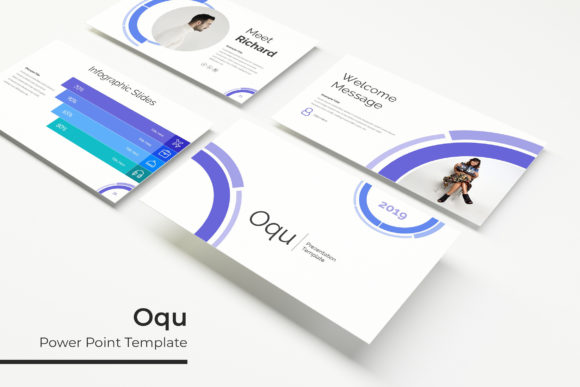
At its core, the Oqu template is built on the principle of visual consistency. With 150+ total slides organized into five distinct premade color palettes, it offers a structured yet flexible framework. Each color variation contains 30 meticulously designed slides, ensuring that from your opening statement to your final call-to-action, every element feels intentionally chosen and harmoniously connected. This isn't about slapping your logo on a generic slide; it's about building a presentation that feels like your brand. The handcrafted infographics are particularly valuable. Instead of struggling to visualize complex data or processes, you have access to professionally designed charts, timelines, and diagrams that communicate with clarity and style. The section break slides and dedicated gallery/portfolio layouts provide natural breathing room, guiding your audience through your narrative in a logical and engaging flow.
Practical Magic: Drag, Drop, and Dominate Your Design Workflow
For the small business owner juggling ten tasks at once, or the marketing professional facing a tight deadline, efficiency is everything. The Oqu template's foundation on master slides is its secret weapon. This means you're not editing hundreds of individual elements; you're working within a smart, interconnected system. Change a color on the master slide, and it updates globally. Resize a text box on one layout, and the grid remains perfect. The pixel-perfect illustrations and picture placeholders with drag-and-drop functionality remove the technical barriers to professional design. You don't need to be a PowerPoint expert to achieve expert-level results. Whether you're preparing a client pitch, a webinar deck, or an internal company report, the time saved on formatting can be redirected to refining your message and strategy. This is design that works for you, not against you.
From Boardroom to Social Feed: Versatile Applications for Modern Creators
The true measure of a great design asset is its versatility. The Oqu PowerPoint template's clean, modern aesthetic makes it a chameleon for various projects. A graphic designer can use it to present a brand identity proposal, showcasing logo concepts and color schemes with professional polish. A content creator can adapt the social media slide layouts to plan and present a cohesive Instagram or LinkedIn content strategy. An entrepreneur can build a stunning investor deck that not only presents data but also embodies the innovative spirit of their startup. The editable graphics allow you to customize every element to match your specific brand guidelines, ensuring that your presentation is a true extension of your visual identity, whether it's being projected in a conference room or viewed on a laptop during a virtual meeting.
Making Smart Design Choices: Pairing, Readability, and Licensing
While the template provides a fantastic structure, thoughtful customization is key to making it your own. Start by considering your audience and goal. Is this a formal financial report or a creative workshop? Choose the color variation that best sets the appropriate tone. When adding your own text, pay close attention to readability. Ensure your chosen fonts (the template includes a readme with free font download links) have sufficient contrast against the background and are sized appropriately for the viewing context. A common practice is to pair a clean sans-serif for body text with a more distinctive serif or script font for headings, creating visual hierarchy. Always review the included font styles to understand the typographic personality you're working with. Finally, for any commercial project, it's crucial to verify the licensing terms of both the template and the fonts to ensure they cover your intended use, protecting your business and your creative work.