Daendels Keynote Template: A Designer's Toolkit for Impactful Presentations
You've spent weeks perfecting your strategy, your data is solid, and your message is clear. But when it comes time to present, you're faced with a blank, uninspiring slide deck. Sound familiar? For many of us—whether we're pitching a new client, sharing quarterly results, or teaching a workshop—the visual delivery is where things can fall flat. A great idea deserves a presentation that commands attention, not one that puts your audience to sleep. This is where having a robust, flexible design asset in your toolkit becomes a game-changer.
Why a Template is More Than Just a Pretty Face
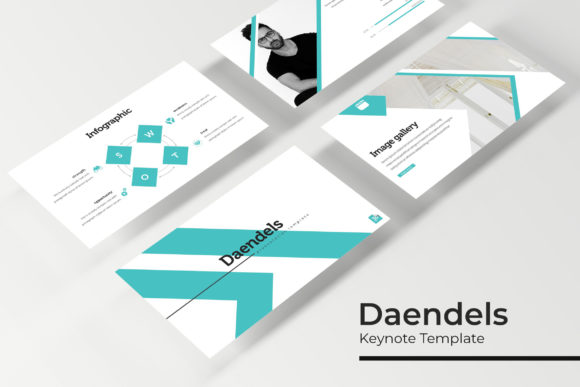
Think of the Daendels Keynote Template not as a rigid cage, but as a sophisticated starting point. It’s built on the principle that great design should save you time, not cost you more of it. With 150+ total slides organized across five premade color schemes, you get a cohesive visual language right out of the box. Each color variation includes 30 meticulously crafted slides, ensuring you have enough layouts for any section of your talk—from data-heavy charts to bold statement slides and clean portfolio galleries. This kind of structure is invaluable for maintaining visual consistency, a cornerstone of strong brand identity. When every slide shares the same design DNA, your audience subconsciously perceives your message as more professional and trustworthy.
From Pitch Decks to Portfolios: Real-World Applications
The true test of any design asset is its versatility. Where can you actually use a template like this? The applications are surprisingly broad and directly impact how your brand is perceived.
- Client Pitches & Proposals: Walk into a meeting with a deck that looks like it was crafted by a top-tier design agency. The handcrafted infographics transform complex data into understandable stories, while section break slides provide natural pauses for discussion.
- Internal Reports & Training: Make quarterly reviews or onboarding materials engaging. The pixel-perfect illustrations and clean layouts help clarify processes and metrics, improving team comprehension and retention.
- Workshops & Webinars: As a content creator or educator, your slides are your stage. The gallery and portfolio slides are perfect for showcasing case studies, student work, or product features, giving your session a polished, authoritative feel.
- Social Media & Marketing Assets: Need to create a carousel for Instagram or LinkedIn? Pull individual slides, resize them effortlessly thanks to the master slide system, and you have on-brand graphics in minutes. This is a huge time-saver for maintaining a consistent visual feed.
- Event Invitations & Programs: Hosting a conference, launch party, or webinar? Use the template to design sleek digital invitations or event programs that set the tone before the event even begins.
The drag-and-drop picture placeholders and resizable graphics mean you’re not just inserting text into boxes. You’re building a narrative where your images, charts, and typography work together seamlessly. This is especially crucial for entrepreneurs and small business owners who often wear the designer hat themselves—it removes the technical barriers to achieving a high-end result.
Building a Cohesive Visual System
One of the most practical pieces of advice in design is to think in systems, not in single assets. The Daendels template encourages this by including everything you need in one package: the PPTX files for both standard and widescreen formats, a clear readme file, and links to the free fonts used. This eliminates the frantic last-minute search for a matching font or the realization that your graphics look blurry when projected.
Consider how this system supports your broader goals. If you're developing a brand identity, the five color variations allow you to experiment with different palettes that might align with various sub-brands or seasonal campaigns. For marketing professionals, having a library of pre-designed infographic layouts means you can quickly adapt the same core data for different audiences without starting from scratch. It’s about working smarter, not harder, and ensuring that every piece of communication, from a formal keynote to a quick social post, reinforces the same professional image.
Making It Your Own: Practical Customization Tips
Downloading the template is just the first step. The real magic happens when you tailor it to your specific voice and message. Here’s how to approach it:
- Start with Your Brand Colors: While the premade colors are a great starting point, don’t hesitate to swap them out for your own brand’s hex codes. The master slide system makes this a global change, ensuring instant cohesion.
- Choose Your Typography Wisely: The included fonts are selected for clarity and modern appeal. Before you begin, review all the font styles available. Consider pairing the display font for headlines with a simpler sans-serif for body text to maximize readability, especially if you have dense information to share.
- Test Your Pairings: If you decide to use your own brand fonts, test them on a few sample slides first. Check how they look at different sizes and against the background colors. Readability is non-negotiable—your audience needs to grasp your points instantly, whether they’re in the front row or watching a recording on their phone.
- Leverage the Illustrations: The pixel-perfect illustrations aren’t just decorative; they’re functional. Use them to visually explain concepts, break up text-heavy sections, or guide the viewer’s eye. Think of them as your visual shorthand.
Remember, the goal isn’t to use every single slide. It’s to have a comprehensive toolkit so you can select the right layout for each part of your story. A portfolio slide is perfect for showcasing client work, while a data visualization slide is essential for your metrics. This strategic selection is what separates a good presentation from a great one.
A Final Thought on Value and Licensing
Investing in a premium template like this is ultimately an investment in your time and professional image. The commercial licensing that typically accompanies such assets means you can use it freely for client work, digital products, and marketing materials—a critical detail for freelancers and agencies. It’s a practical solution that bridges the gap between custom design (which can be costly) and generic free templates (which often lack sophistication and support).
In the end, a powerful presentation does more than share information; it builds confidence—both in your audience and in yourself as a presenter. When you remove the design guesswork, you free up mental space to focus on your delivery, your story, and connecting with the people in the room. That’s the real, tangible value of having a thoughtfully designed asset like the Daendels Keynote Template at your fingertips. It’s not about flashy animations or gimmicks; it’s about clear, compelling communication, delivered with style.