Ethics: A Complete Google Slides Template for Professional Decks
Creating a presentation that looks polished, feels cohesive, and communicates your message effectively is one of those tasks that sounds simple until you sit down to actually do it. You open a blank slide, stare at the cursor blinking back at you, and realize that building a deck from scratch means making hundreds of small decisions about layout, color, typography, and visual hierarchy. That's exactly the kind of creative friction the Ethics Google Slide Template was built to eliminate.
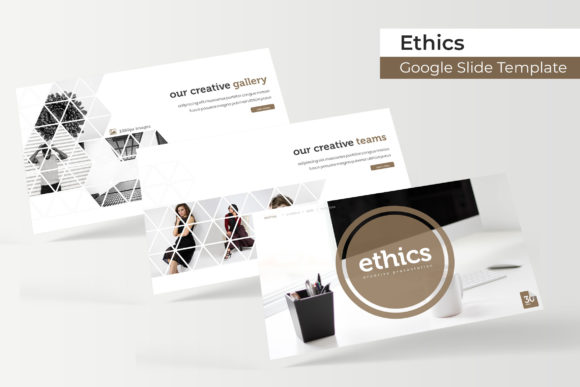
This isn't just another set of slides with a few title layouts and bullet-point templates. The Ethics collection delivers over 150 total slides spread across five premade color themes, with 30 distinct slides per color variation. Each version has been handcrafted with pixel-perfect illustrations and infographic elements that go well beyond what you'd expect from a standard presentation kit. If you work in branding, marketing, education, or any field where visual communication matters, this kind of resource fundamentally changes how quickly you can produce professional-grade work.
What Makes a 150-Slide Template Collection Actually Useful
The sheer volume of slides in the Ethics Google Slide Template isn't about padding the numbers. Each of the five color themes serves a different mood and brand personality. One might work beautifully for a corporate consulting firm that needs understated professionalism. Another could be perfect for a wellness brand that wants warm, approachable tones. Having 30 slides per theme means you're not recycling the same three layouts over and over. You get section break slides, gallery layouts, portfolio showcases, data-driven infographics, team introduction pages, and timeline graphics—all designed to work together without clashing.
The master slide architecture is what makes this practical for real-world use. Every element is built on master slides, which means when you need to adjust a color, swap a font, or reposition an element, the changes propagate consistently across your entire deck. For anyone who has ever spent an afternoon manually fixing misaligned text boxes on slide 34 because they changed something on slide 7, this alone justifies the investment.
Five Color Variations That Cover Serious Ground
Color psychology plays a massive role in how audiences receive your message. The five premade color schemes included in this template aren't random palettes pulled from a color generator. They're carefully curated combinations designed to evoke specific professional contexts. Think about how differently a deep navy and gold palette reads compared to a soft sage and cream combination. One says boardroom authority; the other says thoughtful creativity.
Having these variations pre-built saves you from the common trap of starting with a template and then spending hours trying to recolor it to match your brand. Instead, you pick the theme that's closest to your visual identity, make minor adjustments if needed, and you're ready to build content. This is especially valuable for agencies and freelancers who create presentations for multiple clients. Instead of rebuilding the wheel each time, you rotate through color themes and adapt the layouts to each client's brand guidelines.
Infographics and Visual Storytelling That Actually Communicate
One standout feature of the Ethics collection is the handcrafted infographic elements. Presentation infographics often fall into two camps: overly simplistic clip-art style graphics that look amateur, or overly complex diagrams that confuse more than they clarify. The infographics here strike a useful middle ground. They're detailed enough to convey real data and processes, but clean enough that your audience can absorb the information in the few seconds they'll spend looking at each slide.
The gallery and portfolio slides deserve special mention. If you're a designer, photographer, architect, or creative professional, showcasing your work within a presentation context requires layouts that let the images breathe without overwhelming the slide structure. The placeholder system in this template uses drag-and-drop functionality, so swapping in your own images takes seconds rather than minutes of cropping and resizing. The picture placeholders are sized and positioned to maintain visual balance regardless of what content you drop in, which is a subtle but important design consideration that many templates get wrong.
Practical Applications Across Industries and Project Types
The versatility of a well-structured template like this extends far beyond traditional business presentations. Consider how a small business owner might use these slides. They could build a pitch deck for investors using the data-heavy infographic layouts, then repurpose the same template for a workshop presentation at a local conference, and later adapt the gallery slides into a digital lookbook for their product line. One resource, three completely different outputs.
Content creators and bloggers can leverage the template for creating slide-based content that performs well on platforms like SlideShare or LinkedIn. The section break slides work beautifully as chapter dividers in longer educational content, while the portfolio layouts can showcase photography, design work, or product collections in a format that feels more curated than a standard image grid on social media.
For marketing teams, the template serves as a foundation for campaign presentations, client reports, and internal strategy documents. The visual consistency across all 150 slides means that whether you're building a 10-slide quick pitch or a 40-slide comprehensive review, the output looks like it came from the same design system. That kind of brand coherence builds trust with clients and stakeholders in ways that inconsistent slide decks simply cannot.
Resizable Graphics and Editable Elements for Real Flexibility
Every graphic element in the Ethics Google Slide Template is fully resizable and editable. This matters more than it might sound at first. When a template locks you into fixed-size elements, you end up fighting the design rather than working with it. Need to make an infographic taller to accommodate additional data points? Want to scale down an illustration to make room for supplementary text? The editable vector-based graphics let you do this without degradation or visual awkwardness.
The template is delivered as five PPTX files in widescreen format, along with a Readme file and links to download the free fonts used in the design. It's worth noting that the preview photographs and stock images shown in the template demonstrations are not included—they're there to illustrate how the layouts work when populated with real content. This is standard practice, and it actually gives you more freedom to use your own photography and brand assets rather than being tied to someone else's visual choices.
Making the Most of Your Template Investment
Getting maximum value from a resource like this comes down to a few practical habits. Start by reviewing all 30 slides in your chosen color theme before you begin building. It's tempting to jump straight into adding content, but spending ten minutes familiarizing yourself with the available layouts prevents you from missing a perfect slide design that you didn't know existed. Take note of which layouts work for text-heavy content, which ones are built for visual storytelling, and which ones serve as transitions or dividers.
Customize the master slides to match your specific brand colors and typography before you start populating content. This front-loaded effort pays dividends because every subsequent slide you create automatically inherits your brand specifications. If you're working in Google Slides, you can also save your customized version as a new template for your team, ensuring that everyone produces presentations with the same visual standards.
Don't overlook the section break slides. These transitional pages do more than separate chapters in your presentation—they give your audience a visual pause and signal that a new topic is coming. Used strategically, they improve information retention and keep your audience from experiencing the visual fatigue that comes from wall-to-wall content slides.
Whether you're preparing a keynote for an industry event, building a client-facing proposal, or creating educational materials for your online course, having a robust template library like the Ethics Google Slide Template means your starting point is already miles ahead of a blank canvas. The combination of volume, variety, and thoughtful design makes it a practical addition to any creative professional's toolkit.