Tunner Keynote Template: A Complete Visual Toolkit for Modern Creators
Imagine sitting down to build a presentation for your next big pitch or client workshop, only to realize you're starting from a blank slide. The cursor blinks, the clock ticks, and you know the real work hasn't even started. That's where having a robust, versatile template system changes everything. The Tunner Keynote Template isn't just another set of slides—it's a comprehensive design ecosystem built for professionals who need to communicate ideas clearly and beautifully without spending hours on layout.
Why 150+ Slides Actually Matters for Your Workflow
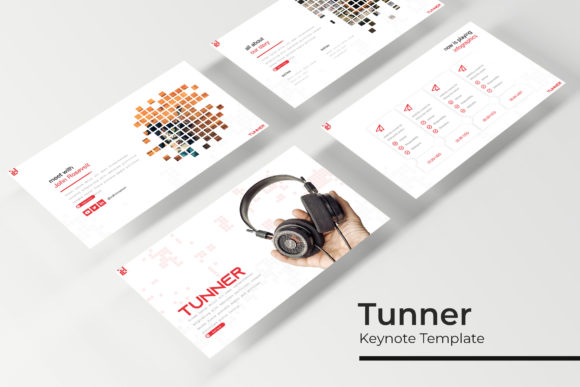
Most presentation templates give you 20 or 30 slides and call it a day. You end up recycling the same layouts, and your decks start feeling repetitive halfway through. Tunner flips that problem on its head with over 150 total slides spread across five premade color variations—30 unique slides per color scheme. That's not padding or filler. Each slide serves a distinct purpose, from section breaks that give your audience a visual breather to gallery layouts perfect for showcasing portfolio work, product photography, or case study visuals.
The handcrafted infographics deserve special attention. Rather than generic chart placeholders, these are thoughtfully designed data visualization slides that actually help you tell a story with numbers. Whether you're presenting quarterly sales figures to stakeholders or mapping out a customer journey for a marketing pitch, having infographics that look polished out of the box saves you from wrestling with alignment and spacing in the middle of a deadline crunch.
For small business owners and entrepreneurs specifically, this depth means you can build an entire brand presentation deck, a product launch pitch, and a team training manual—all from the same template family—without any of them looking identical.
Five Color Palettes That Actually Work in Real Projects
Color variation in a template isn't just about aesthetics—it's about adaptability. The five premade color schemes included with Tunner give you enough range to match different brand identities, client projects, or campaign themes without manually recoloring every element. One palette might lean warm and approachable for a lifestyle brand pitch, while another feels sharp and corporate for a financial services presentation.
This kind of flexibility matters enormously if you're a freelancer or agency designer juggling multiple clients. Instead of buying a separate template for each brand, you have a single system that adapts. The color consistency across each 30-slide set also means you never accidentally mix tones or clash brand guidelines—something that happens more often than most designers care to admit when working under time pressure.
Drag-and-Drop Simplicity Without Sacrificing Quality
One of the standout features of the Tunner Google Slide Template and its Keynote counterpart is the picture placeholder system. Every image frame is set up so you can drag a photo directly onto the slide and have it snap into position, properly cropped and sized. No cropping guides, no manual adjustments, no fighting with aspect ratios at midnight before a morning presentation.
The graphics are fully resizable and editable, built on master slides that maintain pixel-perfect quality whether you're projecting on a conference room screen or sharing a PDF export via email. This master slide architecture also means that if you want to adjust a recurring element—say, changing the position of your logo or tweaking a footer design—you make that change once and it cascades through the entire deck automatically.
For content creators who regularly produce educational materials, webinar slides, or online course content, this structural foundation turns what used to be a tedious formatting process into something closer to an assembly line. You focus on your message and your images; the template handles spatial harmony.
Practical Applications Beyond the Obvious
Yes, Tunner works brilliantly for traditional business presentations. But its design language opens doors to less conventional uses that creative professionals will appreciate. Social media managers can export individual slides as Instagram carousel graphics or LinkedIn post visuals, maintaining brand consistency across platforms without opening a separate design tool. Packaging designers might use the infographic and section break slides to present concept boards to clients, arranging product mockups alongside typography explorations and color studies.
Bloggers and digital product creators find particular value in the gallery and portfolio slides. If you're launching a new ebook, an online workshop, or a product collection, those layouts let you create compelling sales presentations or pitch decks that feel intentional rather than improvised. The clean, modern typography pairs well with both serif and sans serif fonts, giving you room to match the template's visual personality to your existing brand identity without clashing.
Even invitations and editorial layouts become more approachable. The section break slides, with their bold visual hierarchy, work surprisingly well as event announcement graphics when exported as standalone images. Wedding planners, event coordinators, and anyone organizing workshops or retreats can adapt these slides into save-the-dates, schedule cards, or program booklets with minimal effort.
What's Actually in the Box
Transparency about deliverables matters when you're investing in design assets. Here's exactly what comes with the Tunner template package:
- 5 PPTX files for standard presentations
- 5 PPTX widescreen files for modern display formats
- 5 premade color variations, each containing 30 unique slides
- A Readme First file with setup instructions
- Font information with free download links so you can replicate the exact look
The font pairing within the template is worth examining closely. The designers chose typefaces that balance readability with personality—clean enough for body text on dense information slides, distinctive enough for headers that need to command attention from across a room. If you're someone who struggles with typography decisions, studying how these fonts interact on the included slides can teach you practical lessons about hierarchy, contrast, and spacing that transfer directly to your other design work.
Getting the Most From Your Template Investment
A few practical recommendations once you start working with Tunner. First, spend ten minutes browsing every slide in a single color variation before you start building. Understanding the full inventory of layouts available prevents you from reinventing wheels that already exist in the template. You might discover a timeline slide that perfectly fits your project roadmap or a comparison layout you hadn't considered for a competitor analysis.
Second, don't feel locked into the default color schemes. Because the graphics are editable, you can adjust accent colors to match specific brand guidelines while keeping the structural integrity of the design intact. Just be consistent—if you shift the primary accent from blue to teal, make that change across your entire deck using the master slide system rather than editing slides individually.
Third, remember that photographs and product images used in template previews are illustrative only and aren't included in the download. Plan your own photography or source images separately. The picture placeholders are designed to make this swap seamless, but having your images ready before you start assembling slides keeps the process flowing smoothly.
For anyone building a brand, pitching clients, teaching workshops, or simply communicating ideas more effectively, the Tunner Keynote Template offers a foundation that respects both your time and your audience's attention. It doesn't try to be everything—it gives you a well-organized, visually coherent starting point that you make your own.