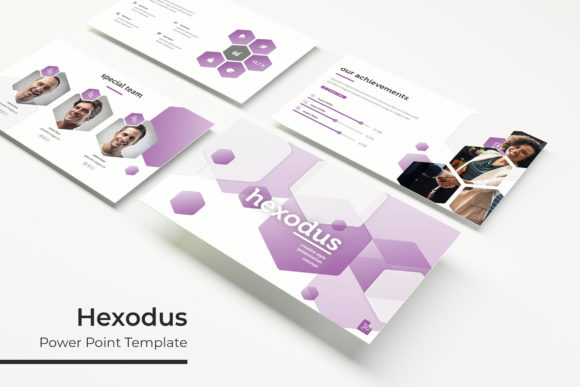
Hexodus: Streamline Your Presentations with This Dynamic Template
There's a particular kind of frustration that sets in when you're staring at a blank PowerPoint slide, knowing your big idea is there but the execution feels miles away. You have the data, the strategy, the story—but turning that into a visual presentation that holds a room's attention? That's where the hours start to disappear. For professionals who need to deliver polished decks without the design overhead, a robust template system isn't a luxury; it's a necessity. This is where the Hexodus Power Point Template enters the conversation, offering a structured yet flexible foundation for everything from investor pitches to creative portfolios.
A Foundation Built for Visual Clarity and Brand Consistency
At its core, Hexodus is designed to solve two pervasive presentation problems: visual monotony and brand inconsistency. With 150+ total slides organized across five premade color schemes—each containing 30 dedicated slides—it provides ample room to build a narrative without repeating layouts. This isn't just about having more slides; it's about having a coherent visual language. Each color variation acts as its own cohesive template, ensuring that from the first introduction slide to the final "Thank You," your presentation maintains a unified aesthetic. The included handcrafted infographics and section break slides are particularly valuable, allowing you to present complex data or transition between ideas with visual professionalism that feels intentional, not generic.
For a small business owner or marketing manager, this translates directly to efficiency. You're not spending hours aligning text boxes or hunting for icons. The pixel-perfect illustrations and Master Slides architecture mean that design elements are already optimized for clarity and scalability. Whether you're projecting on a conference room screen or sharing a PDF digitally, the visuals remain sharp. The gallery and portfolio slides offer ready-made frameworks for showcasing products, case studies, or creative work, which is a huge time-saver for designers and agencies preparing client-facing materials.
Practical Flexibility: Drag, Drop, and Customize
One of the standout features of the Hexodus template is its emphasis on user-friendly customization. The resizable and editable graphics along with picture placeholders that support drag-and-drop functionality make it accessible even to those with minimal PowerPoint experience. Need to swap out a team photo? Drag your image into the designated placeholder, and it automatically crops and fits the space. Want to adjust an infographic's color to match your brand's secondary palette? The editable vectors allow for quick changes without breaking the design structure.
This level of adaptability makes Hexodus more than just a presentation template; it becomes a versatile design asset. Consider its applications beyond a standard slide deck:
- Brand Guidelines Decks: Use the structured slides to outline your brand's typography, color palette, and voice.
- Social Media Strategy Pitches: The infographic slides are perfect for visualizing campaign timelines, audience demographics, and platform analytics.
- Product Launch Packages: Combine portfolio slides with feature breakdowns to create compelling sales materials for retail partners.
- Internal Training Modules: The clean layout and section breaks help organize educational content for employee onboarding or software training.
For entrepreneurs and content creators, this means your marketing assets can maintain a consistent look across different formats. The same visual style used in a webinar presentation can be adapted for a PDF download or a keynote address, reinforcing brand recognition through repeated, professional exposure.
What's Inside the Package and How to Get Started
The Hexodus download is comprehensive, designed to get you up and running with minimal friction. The package includes:
- 5 PPTX Files (standard format)
- 5 PPTX Widescreen Files (16:9 aspect ratio)
- 5 Premade Color Variations as mentioned
- A "Readme First" document with setup instructions
- Free font download links for all typefaces used in the template
A critical note for commercial users: the font licenses are included via download links, meaning you can use the specified typefaces in your projects without additional cost, but always verify the license terms for your specific use case (e.g., for merchandise or large-scale distribution). The template itself is licensed for commercial use, allowing you to create client work, sales materials, and digital products. However, the preview photographs are not included; they are placeholders to demonstrate layout potential. You will need to supply your own imagery, which is where the drag-and-drop placeholders become invaluable.
Matching the Template to Your Project Goals
Choosing a presentation template is a strategic decision. The Hexodus Power Point Template leans towards a modern, clean, and slightly geometric aesthetic—think tech startups, design studios, or forward-thinking consultancies. Its strength lies in its structured versatility. Before diving in, consider:
- Audience and Context: Is this for a formal board meeting, a creative workshop, or a webinar? The five color schemes range from more corporate tones to vibrant, creative palettes. Select the variation that best matches your audience's expectations and your brand's personality.
- Content Density: If your presentation is data-heavy, prioritize the infographics and chart slides. If it's more narrative-driven, the portfolio and section break slides will help pace your story.
- Brand Integration: While the template offers ready-made colors, the real power comes from adapting it to your exact brand palette. Use the editable color swatches in the Master Slides to input your hex codes, ensuring every slide feels uniquely yours.
Think of Hexodus not as a finished product, but as a high-quality starting point. Its value is in the hours it saves you on layout and design fundamentals, freeing you to focus on your message, your data, and your unique brand story. For the busy professional, that time savings is often worth far more than the template itself. It's a practical tool for creating professional presentations that communicate competence and clarity, helping you make the impact you need without the design degree.