Lapse Power Point Template: Crafting Visual Stories with Ease
Every presentation tells a story, but not every story gets heard. The difference often lies in the visual foundation supporting your message. A cluttered slide deck with mismatched colors and amateur graphics can distract even the most compelling content. That’s where a thoughtfully designed template like the Lapse Power Point Template shifts the dynamic entirely, transforming a standard slideshow into a cohesive visual narrative that commands attention and communicates professionalism from the first click.
A Foundation Built for Visual Impact
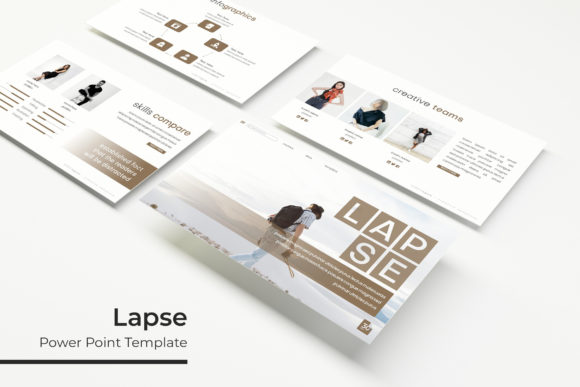
What sets this template apart is its remarkable balance between aesthetic appeal and functional design. With over 150 total slides organized across five premade color variations, you’re not just getting a single look—you’re gaining a versatile visual system. Each color scheme offers 30 meticulously crafted slides, giving you the flexibility to match specific brand guidelines, project moods, or audience preferences without starting from scratch. The color palettes themselves feel contemporary and intentional, ranging from muted professional tones to more vibrant options that pop on screen.
The handcrafted infographics deserve special attention. Rather than generic clipart or overused symbols, these visual elements feel purposeful and polished. They help translate complex data, processes, or concepts into digestible graphics that enhance understanding rather than complicate it. Whether you’re illustrating market research, project timelines, or service breakdowns, these infographics provide a professional shorthand that elevates your message immediately.
Practical Applications Beyond the Boardroom
While many associate PowerPoint templates with corporate presentations, the Lapse template’s design sensibility extends far beyond quarterly reviews and sales pitches. Consider these real-world applications where its features shine:
- Brand Development Workshops: Use the consistent slide layouts to present brand guidelines, color theories, and logo concepts to clients. The pixel-perfect illustrations maintain visual integrity whether displayed on a laptop or projected on a large screen.
- Social Media Content Creation: The gallery and portfolio slides offer perfect frameworks for showcasing Instagram grids, Facebook campaign mockups, or Pinterest board concepts. Export individual slides as high-quality images for actual social media graphics.
- Product Launch Presentations: The section break slides create natural pauses in your narrative, allowing you to introduce new product features, pricing tiers, or marketing strategies with visual breathing room.
- Educational Materials: For trainers, educators, or workshop facilitators, the resizable and editable graphics adapt beautifully to curriculum content, making learning materials more engaging and professional.
- Client Onboarding Packages: Create polished welcome decks that outline processes, introduce team members, and set expectations with the template’s clean, trustworthy aesthetic.
Design Efficiency Meets Creative Control
One of the most practical advantages is how this template respects your time while expanding your creative options. The drag-and-drop picture placeholder system eliminates the frustration of manually resizing and repositioning images. Simply click, select your photograph, and watch it perfectly fill the designated space. This feature alone transforms the presentation creation process from a technical chore into a more intuitive, creative exercise.
The master slide architecture ensures visual consistency across your entire presentation. When you need to make global changes—adjusting font sizes, modifying color accents, or repositioning elements—you do it once on the master slide, and those changes cascade throughout. This structural integrity prevents the common pitfall of slides drifting into visual inconsistency as presentations grow longer or more complex.
For those who work with clients or collaborate with teams, this consistency becomes invaluable. It maintains brand integrity across multiple presentations created by different team members, ensuring that every external communication looks like it came from the same professional source.
Visual Communication That Builds Recognition
In a world saturated with information, visual consistency becomes a competitive advantage. When your presentations, social graphics, and marketing materials share a cohesive visual language, you build brand recognition that works subconsciously on your audience. The Lapse template facilitates this by providing a complete visual system rather than isolated slide designs.
The included PPTX files work across both standard and widescreen formats, accommodating different presentation environments and display technologies. Whether you’re presenting in a traditional conference room with a 4:3 projector or a modern venue with widescreen displays, your content adapts seamlessly without compromising layout or visual impact.
The pixel-perfect illustrations deserve another mention here. In an era of high-resolution displays and crisp digital viewing, blurry or poorly rendered graphics immediately undermine credibility. These illustrations maintain their sharpness and clarity whether viewed on a laptop screen, tablet, or projected in a large auditorium, ensuring your visual communication always looks intentional and professional.
Practical Considerations for Implementation
Before diving into your next project with this template, consider these implementation tips:
- Color Scheme Selection: Don’t default to your favorite color. Consider the emotional response each palette evokes and how it aligns with your presentation’s purpose. The professional blues might work perfectly for a financial report, while the warmer tones could better serve a creative agency pitch.
- Content Hierarchy: Use the template’s structural elements intentionally. The section breaks aren’t just visual dividers—they’re opportunities to reset your audience’s attention and introduce new themes or concepts.
- Image Quality: While the template includes placeholder areas, the quality of your actual photographs and graphics matters. The drag-and-drop system works best with high-resolution images that maintain clarity when cropped or resized.
- Font Integration: The readme file’s font guidance is crucial. Using the recommended free fonts ensures your text renders exactly as intended across different devices and operating systems, maintaining the template’s typographic balance.
- Export Strategies: Remember that you can export individual slides as images for use in other contexts. A well-designed title slide could become a website header, while an infographic slide might serve perfectly as a social media graphic.
The practical reality of modern design work means that assets need to work across multiple platforms and applications. This template acknowledges that reality by providing a system that’s both presentation-focused and adaptable to broader visual communication needs. The five included PPTX files give you immediate variety, while the editable graphic elements ensure you can tailor everything to specific projects without limitations.
For entrepreneurs and small business owners especially, this kind of design asset represents smart investment. Rather than hiring a designer for every presentation or settling for generic templates that don’t quite fit, you gain a professional foundation that you can customize and reuse across numerous business communications. The time saved on formatting and layout can be redirected toward refining your message and strategy—where your expertise truly matters.
The visual consistency this template provides does more than just look good—it builds trust. When every slide, graphic, and color choice feels intentional and polished, your audience unconsciously attributes that professionalism to your content and, by extension, your brand. In competitive markets where credibility can be the deciding factor, that visual trust becomes a tangible business asset.