Sedonia PowerPoint Template: Crafting Visual Stories with 150+ Slides
You know the feeling. You open a blank PowerPoint deck, the cursor blinking expectantly, and the pressure is on. Whether you're pitching a new client, presenting quarterly results to your team, or launching a product, the presentation needs to be more than just informative—it needs to be memorable. It needs to tell a visual story that holds attention and communicates professionalism. This is where a well-built template transitions from a nice-to-have to a fundamental design asset, saving you hours and elevating your output.
A Foundation Built for Versatility
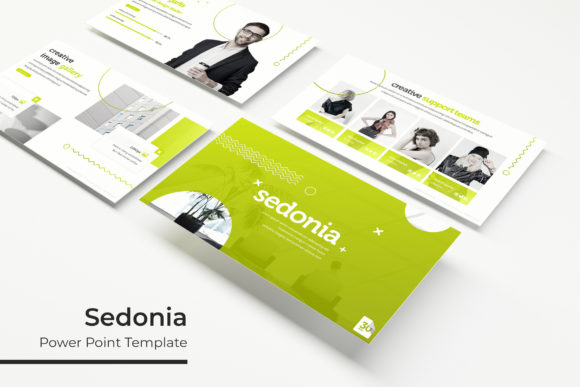
The Sedonia PowerPoint Template isn't just a single set of slides; it's a comprehensive toolkit designed for real-world application. With over 150 total slides, it provides a robust foundation for virtually any presentation scenario. The structure is intelligently divided across five premade color palettes, offering 30 distinct slides for each variation. This means you're not just getting a template—you're getting five cohesive visual identities ready to deploy. The handcrafted infographics are particularly noteworthy, transforming complex data into clear, engaging visual narratives that audiences can grasp instantly.
Think about the practical implications. For a startup founder, one color scheme might perfectly align with a brand's primary palette, while another variation could be reserved for internal team updates or investor decks. The inclusion of dedicated section break slides and gallery/portfolio layouts demonstrates an understanding of how presentations actually flow, allowing for natural pauses and visual showcases of work, products, or case studies.
From Concept to Polished Deck in Minutes
The true test of any design template is its ease of use without sacrificing quality. Sedonia addresses this directly with features built for efficiency. Every graphic is fully resizable and editable, ensuring your charts and diagrams fit perfectly without distortion. The drag-and-drop picture placeholders are a game-changer for busy professionals. Instead of wrestling with image cropping and positioning, you can simply drag your photographs into the designated frames, and the template handles the rest, maintaining pixel-perfect alignment.
This is where the "Based on Master Slides" architecture proves its worth. By making core edits on the master slide—like updating a logo or changing a global font—you ensure consistency across every single page. This prevents the common pitfall of mismatched fonts or inconsistent color applications that can make a presentation look amateurish. For a marketing team, this means brand guidelines are enforced effortlessly, ensuring every external-facing presentation reinforces brand recognition.
Beyond the Boardroom: Creative Applications
While designed for presentations, the assets within Sedonia extend far beyond a simple slide deck. The high-quality, scalable illustrations and infographic elements are valuable design assets in their own right. Consider the possibilities:
- Brand & Marketing Collateral: Extract and adapt the infographics for use in blog post headers, social media graphics, or quarterly reports. The cohesive visual style helps maintain a unified brand identity across all platforms.
- Digital Products & Educational Content: Course creators and educators can use the template to develop visually consistent lesson slides, workbooks, or webinar materials that feel professional and are easy for students to follow.
- Pitch Decks & Proposals: The gallery and portfolio slides are perfect for showcasing previous work, client testimonials, or product features in a clean, modern layout that builds credibility.
The included PPTX widescreen files are optimized for modern displays, ensuring your content looks sharp on everything from a laptop screen to a conference room projector. This attention to technical detail is what separates a premium template from a basic one.
Practical Guidance for Maximum Impact
Having a powerful tool is one thing; using it effectively is another. Here’s how to get the most out of a resource like this:
- Align with Your Goals: Before you even open the file, define the core message of your presentation. Are you educating, persuading, or informing? Choose the color variation that best matches the tone—perhaps a more subdued palette for a financial report and a vibrant one for a creative pitch.
- Customize Thoughtfully: The template provides the structure, but your content is the star. Replace placeholder text with your own concise, compelling copy. Use the infographic layouts to simplify your most important data points. Remember, the goal is clarity, not decoration.
- Leverage the Assets: Don’t let the illustrations sit idle. If a particular diagram perfectly explains a concept, consider using it in a standalone social media post or as part of a printed handout. The value is in the versatility of the assets provided.
- Review Licensing for Peace of Mind: The package includes a clear readme file and information on the fonts used, with free download links. This transparency is crucial for commercial projects, allowing you to verify that all elements are cleared for your intended use, whether for client work, merchandise, or digital products.
Ultimately, a template like Sedonia is about removing friction from the creative process. It provides a professionally designed, cohesive visual system that allows you to focus on your message and your audience. It’s a practical investment for anyone who regularly communicates ideas visually, ensuring your presentations are not only seen but remembered.