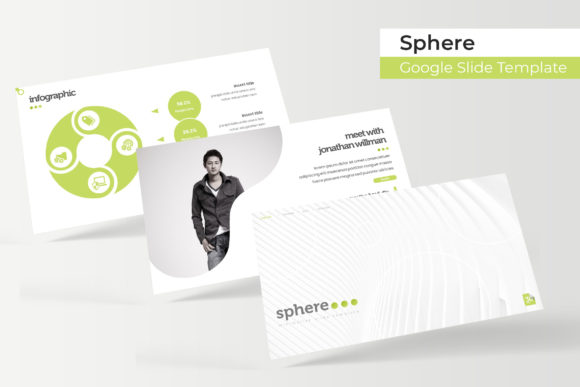
Mastering Visual Storytelling with the Sphere Slide Template
Imagine stepping into a meeting room, a virtual webinar, or a client pitch knowing your visual aids are bulletproof. You aren't scrambling to align text boxes or worrying if your color scheme clashes; instead, you are presenting a cohesive, high-impact narrative that captures attention instantly. For many professionals—whether you are a startup founder pitching to investors, a marketer launching a new campaign, or a designer finalizing a brand identity deck—this level of confidence is rare. We often spend more time fighting with software formatting than we do refining our actual message. The Sphere Google Slide Template is designed to bridge that gap, offering a robust framework of over 150 slides that allows you to focus entirely on your content and strategy.
Beyond Basic Slides: The Anatomy of a Professional Deck
What separates an amateur presentation from a professional one isn't just the information; it's the architecture of the visual delivery. The Sphere template distinguishes itself by offering a massive library of resources—specifically, 150+ total slides distributed across five premade color variations. This structure ensures that you have 30 distinct slide layouts for each specific color palette. This isn't just about changing the background color; it is about having a fully realized design system at your fingertips.
For the busy entrepreneur or content creator, the value lies in the "drag and drop" functionality. The template utilizes Picture Placeholders that are fully resizable and editable. This means you don't need to be a Photoshop wizard to make your images look sharp. If you are working on a product launch for social media graphics or preparing a quarterly report, you simply drag your high-resolution images into the designated zones. The template handles the cropping and scaling, ensuring pixel-perfect illustrations every time. This feature alone can save hours of production time, allowing you to maintain a consistent visual language across your entire presentation.
Visual Consistency and Brand Recognition
One of the most critical aspects of modern branding is consistency. Whether you are designing a pitch deck, a website mockup, or packaging for a new product, the visual identity must remain uniform. The Sphere template facilitates this through its Master Slides architecture. By editing the master slides, you can globally change fonts, adjust color schemes, or tweak layout elements, and those changes will reflect throughout the entire 150-slide deck.
Consider a scenario where you are a small business owner rebranding. You have chosen a specific sans serif font for your headers and a clean serif font for your body text to enhance readability. Instead of manually updating every single slide, the Master Slide feature ensures that your typography and color choices are locked in. This creates a professional presentation that reinforces your brand identity with every click. Furthermore, the inclusion of handcrafted infographics is a game-changer. Data visualization is often where presentations fall flat, but with pre-designed, editable graphic sections, you can turn dry statistics into compelling visual stories that engage your audience.
Practical Applications for Creative Professionals
The versatility of the Sphere Google Slide Template extends far beyond the boardroom. Its clean, modern aesthetic makes it a valuable asset for a wide range of creative projects. Here is how different professionals can leverage this toolkit:
- Graphic Designers & Brand Strategists: Use the portfolio slides to showcase logo design concepts or packaging mockups. The widescreen format provides ample canvas to let your designs breathe, ensuring your work is the focal point.
- Marketers & Social Media Managers: Create detailed campaign strategies or editorial layouts. The section break slides are perfect for transitioning between different phases of a marketing plan, such as "Awareness," "Consideration," and "Conversion."
- Web Designers & Developers: Present website wireframes or user interface (UI) designs. The grid-based layouts align perfectly with modern web design principles, making it easy to map out user journeys.
- Content Creators & Bloggers: Turn blog posts into visual summaries or create digital products like e-books and lookbooks. The picture placeholders allow you to create stunning visual narratives without needing complex design software.
Imagine a wedding planner using this template to create a bespoke invitation presentation for a client, or an interior designer using the gallery slides to present a renovation concept. The ability to resize and edit every graphic element means the template molds to your specific creative vision, rather than forcing you into a rigid structure.
Optimizing Your Workflow with Design Assets
Efficiency is the currency of the modern creative economy. The Sphere template includes five PPTX files in widescreen format, along with a "Readme First" file that includes a link to download the free font used in the preview. This attention to detail ensures that your final output matches the high-quality preview you saw initially.
When working with this template, consider the following workflow tips to maximize your impact:
- Font Pairing Strategy: While the template comes with a recommended font, don't be afraid to experiment with other premium fonts to match your specific brand voice. Test a bold display font for headers to grab attention, paired with a highly legible body font for the details.
- Color Psychology: Utilize the five premade colors to your advantage. If you are presenting to a corporate client, stick to the more subdued, professional palettes. If you are pitching a lifestyle brand or a creative event, opt for the bolder, more vibrant color variations included in the pack.
- Image Selection: Since the photographs used in the preview are for illustration purposes only, take time to source high-quality stock images or your own photography that matches the resolution requirements. High-contrast images often work best with the clean layouts provided.
- Readability Checks: Always run a final check for readability. Ensure that your text contrasts sufficiently with the background colors and that your font sizes are large enough to be read in a conference room setting.
Elevating Your Visual Communication
In a digital landscape saturated with noise, the quality of your visual assets speaks volumes about your professionalism. A disjointed presentation can undermine your credibility, while a polished, cohesive deck can elevate your authority. The Sphere Google Slide Template acts not just as a set of slides, but as a comprehensive design system for visual storytelling.
Whether you are preparing for a high-stakes investor pitch, designing marketing assets for a product launch, or compiling a portfolio to attract new clients, having a reliable, versatile template is essential. It removes the friction of design production, allowing you to focus on what truly matters: delivering a message that resonates, informs, and inspires. By leveraging the handcrafted infographics, the intuitive drag-and-drop placeholders, and the extensive color variations, you are equipped to handle any visual communication challenge with confidence and style.