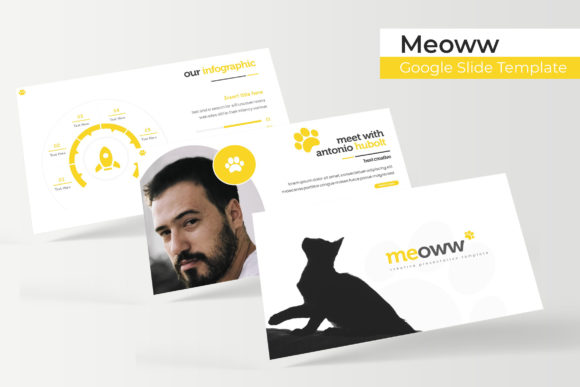
Meoww Google Slide Template: Crafting Visual Harmony in Presentations
That moment when you open a blank presentation file can feel paralyzing. You have the ideas, the data, the story you need to tell, but staring at a default white slide with black text feels like trying to paint a masterpiece on a napkin. Whether you are pitching a new client, presenting quarterly results to stakeholders, or teaching a complex concept, the visual framework of your slides dictates how your message lands. It is not just about looking "pretty"; it is about establishing credibility, guiding the viewer’s eye, and maintaining focus. This is where the gap between a mediocre pitch and a winning presentation often lies.
When we think about design assets, we often focus on logos or social media graphics, but the presentation deck is arguably one of the most critical touchpoints in business communication. A disjointed deck—where fonts change randomly, colors clash, and layouts shift from slide to slide—subconsciously signals a lack of attention to detail. On the other hand, a cohesive, well-designed deck acts as a silent partner, reinforcing your authority and allowing your content to shine without visual distractions. The challenge, however, is time. Most professionals don't have hours to spend aligning text boxes or sourcing color palettes. This is exactly the problem the Meoww Google Slide Template was designed to solve.
Why Structure Matters: The 150+ Slide Advantage
The sheer volume of content included in this package is one of its most practical strengths. With over 150 total slides, this isn't a collection of a few generic layouts; it is a comprehensive design system. The package is built around five premade color themes, offering 30 distinct slide layouts for each color variation. This structure provides immense flexibility. For instance, if you are working on a pitch deck for a client in the beauty industry, you might select a soft, pastel color scheme. If you are presenting a quarterly financial report for a tech startup, a bold, high-contrast scheme might be more appropriate.
This variety eliminates the need to force a single template to fit every scenario. Instead of spending time manually recoloring elements—a process that often leads to errors and inconsistencies—you can simply switch to a different PPTX file included in the bundle. The "Meoww -Google Slide Template Presentation" approach ensures that your visual identity remains consistent while giving you the freedom to adapt to different moods and audiences. It is about working smarter, not harder, allowing you to focus on the narrative rather than the mechanics of the slide design.
Pixel-Perfect Illustrations and Handcrafted Infographics
One of the standout features of this collection is the emphasis on high-quality visual assets. We have all seen templates where the graphics look pixelated or the icons feel generic and lifeless. The Meoww template set includes pixel-perfect illustrations that maintain their sharpness across different screen sizes, which is crucial in an era where presentations are viewed on everything from massive projectors to small smartphone screens.
Furthermore, the inclusion of handcrafted infographics changes the game for data presentation. Data dumps are the enemy of engagement. A wall of numbers is difficult to parse, but a well-designed infographic can turn complex data into a compelling story. These aren't just auto-generated charts; they are designed elements that allow you to visualize processes, timelines, and statistics in a way that is both aesthetically pleasing and easy to understand. Whether you are mapping out a customer journey or breaking down a budget, these graphics provide the clarity needed to make your point stick.
Practical Workflow: Drag, Drop, and Customize
For the busy entrepreneur or the content creator juggling multiple projects, efficiency is everything. The Meoww Google Slide Template is built on a Master Slides architecture. If you aren't familiar with how Master Slides work, think of them as the "master blueprint" of your presentation. It controls the global styles—fonts, colors, and recurring logos—so you don't have to edit them on every single page.
This setup makes the template incredibly user-friendly. The "Resizable and Editable Graphic Picture Placeholder" feature is particularly useful here. Instead of cropping and resizing images in an external photo editor before importing them, you can simply drag and drop your photos directly onto the slide. The placeholder automatically crops the image to fit the design frame perfectly. This feature alone can save hours of formatting time, ensuring that every image in your deck is uniform and professional. It democratizes design, allowing someone with minimal technical skills to produce a deck that looks like it was made by a seasoned graphic designer.
Beyond the Slides: Versatility for Branding and Marketing
While the primary function of this asset is for presentations, the design elements within the Meoww template are versatile enough to be repurposed for other marketing materials. In today's fast-paced digital landscape, content repurposing is a key strategy for maximizing ROI on design assets.
Consider the Section Break Slides included in the deck. These are often designed with bold typography and striking visuals, making them perfect candidates for social media graphics. You could easily export a section break slide and use it as an Instagram story background or a LinkedIn post header. Similarly, the Gallery and Portfolio slides offer pre-designed grid layouts that are ideal for creating mood boards or showcasing products on a website.
For those involved in branding and packaging design, the consistent color palettes and typography choices within the template can serve as a starting point for broader brand identity work. If you are launching a new product and need to quickly visualize how your brand colors look in a layout, using a template like this can help you prototype concepts before moving to more complex software like Adobe Illustrator or InDesign. It acts as a bridge between the idea stage and the execution stage.
Typography and Visual Consistency
A presentation is only as good as its readability. The Meoww template utilizes free fonts, and importantly, includes the download links for them in the "Readme First" file. This is a detail that many template creators overlook, leading to frustration when a user opens a file only to see "missing font" errors. By providing access to the specific typefaces used, the template ensures that the visual consistency of the design is preserved.
Good typography does more than just display words; it conveys tone. A modern, sans-serif font might suggest innovation and efficiency, while a serif font might evoke tradition and reliability. The font pairings chosen for this template are designed to maximize readability while maintaining a contemporary aesthetic. When you pair these typography choices with the 5 PPTX Widescreen files provided, you are equipped to deliver a viewing experience that feels native to modern displays, filling the screen without awkward black bars or stretched images.
Final Thoughts on Asset Management
It is important to note a standard best practice regarding stock assets: the photographs or pictures used in the preview are intended for illustration purposes only and are not included in the download. This is common with premium templates to keep file sizes manageable and avoid licensing conflicts with stock photography. However, because the template uses picture placeholders, swapping out the preview images for your own high-resolution photos or free stock images from sites like Unsplash or Pexels is a seamless process.
Ultimately, the Meoww Google Slide Template is more than just a set of slides; it is a toolkit for professional communication. It addresses the common pain points of design—lack of time, lack of technical skill, and the need for consistency. By leveraging the Master Slides system, the handcrafted infographics, and the versatile color variations, you can elevate your presentations from simple slideshows to powerful visual narratives. Whether you are a small business owner looking to impress investors or a marketer preparing a campaign overview, having a reliable, high-quality template in your arsenal is an investment in your professional image.