Real Keynote Template: Master Your Next Presentation
You have ten minutes to present your quarterly results, your new product launch, or your business plan to a room full of people who hold the keys to your next big move. You open your laptop, click on the presentation file, and the first slide appears. It’s cluttered, the colors are dull, and the text is a wall of words. Before you’ve even said a single sentence, you can feel the energy in the room deflate. We’ve all been there, and we’ve all seen the opposite: a presentation that captivates from the first click, where the visuals support the story and the design feels intentional and professional. The difference often isn’t the content itself, but the vessel it’s delivered in. That’s where a thoughtfully crafted resource like the Real Keynote Template comes into play, transforming a standard slideshow into a compelling visual narrative.
Beyond the Default: Why Your Slides Need a Visual System
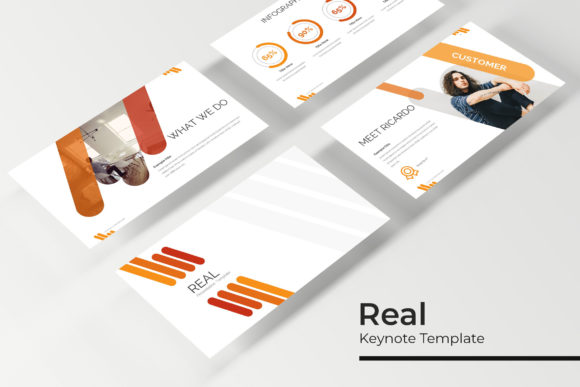
Most presentation software comes with a handful of built-in themes. They’re functional, but they’re also the digital equivalent of wearing a plain white t-shirt to a job interview. It does the job, but it doesn’t tell a story or make a memorable impression. The Real Keynote Template isn’t just a collection of pretty slides; it’s a comprehensive visual system. With over 150 total slides, it provides a robust framework for any narrative you need to build. The true power lies in its structure: five premade color schemes, each containing 30 meticulously designed slides. This isn’t about just changing the background hue. Each color variation is a fully realized aesthetic direction, allowing you to instantly align your presentation with your brand’s specific palette or the mood of your content. Whether you need the clean professionalism of a corporate blue, the energetic vibe of a startup orange, or the elegant touch of a muted pastel, the system is ready. This level of built-in variety saves hours of design work and eliminates the guesswork of trying to force a generic template to fit your brand identity.
Practical Tools for Real-World Storytelling
A great presentation does more than list facts; it guides the audience through a journey. This is where the specific features of the Real Keynote Template become invaluable assets for anyone from a solopreneur to a marketing team lead. The handcrafted infographics are a standout. Instead of struggling with complex chart tools or settling for a basic pie graph, you have access to beautifully designed, pre-animated visualizations. Use them to break down market data, explain a process flow, or illustrate a timeline. They make complex information digestible and engaging, which is crucial for holding attention during a data-heavy section. Complementing these are the dedicated section break slides. These act as visual chapter markers, giving your audience a mental pause and signaling a shift in topic. This simple structural element dramatically improves the flow and professionalism of your delivery, making your narrative easier to follow.
For those in creative fields—designers, photographers, architects, or even real estate agents—the gallery and portfolio slides are a game-changer. These layouts are specifically crafted to showcase visual work. The picture placeholders are not just empty boxes; they are resizable and editable graphic frames that use a simple drag-and-drop function. You can insert your images directly from your desktop, and the template’s master slides ensure everything stays perfectly aligned and proportioned. This pixel-perfect approach means your work is presented with the care it deserves, free from awkward cropping or misaligned edges. The entire template is built on master slides, a feature that might sound technical but is incredibly practical. It means that when you change a font style on the master, it updates across all 150+ slides. When you adjust the color theme, the entire deck transforms consistently. This foundation guarantees visual consistency, a cornerstone of strong brand recognition and professional presentation.
From Slide Deck to Brand Asset: Maximizing Your Investment
Thinking of this resource as just a presentation template limits its potential. In reality, the components inside the Real Keynote Template can be repurposed to strengthen your broader brand identity and marketing materials. The cohesive visual language established by the color schemes and design elements can inform other projects. For instance, the infographic styles can be adapted for use in a blog post or a social media graphic. The clean, modern typography and layout principles can inspire the design of a one-page website or a digital product brochure. This cross-pollination of design assets is what separates a good brand from a great one. It creates a seamless experience for your audience, whether they’re watching your live presentation, scrolling through your Instagram feed, or reading your latest case study.
Consider the workflow efficiency. The drag-and-drop functionality and the logical slide structure aren’t just about ease of use; they’re about reducing friction in your creative process. When you’re not fighting with formatting, you have more mental space to focus on your message, your delivery, and the strategic goals of your presentation. For a small business owner pitching for funding, this could mean more time rehearsing answers to tough questions. For a content creator, it could mean crafting a more compelling story arc. The included “Readme First” file and the link to the free font used in the design are thoughtful touches that demonstrate a focus on the user’s complete experience, ensuring you can replicate the previewed look exactly.
Making the Right Choice for Your Project
Choosing any design asset, whether it’s a premium font, a set of icons, or a template like this, should be a decision guided by your project’s specific needs. Start by auditing your brand’s existing visual language. What are your core colors? What is the general tone—formal, friendly, innovative, traditional? The Real Keynote Template’s five color schemes offer a great starting point for exploration. Don’t just pick your favorite; pick the one that best resonates with your audience and your objectives. A financial services firm might lean towards the deep navy and slate variation, while a wellness brand might gravitate towards the soft greens and earth tones.
Next, think about the content you’ll be presenting. Will it be heavy on data? Prioritize the slides with infographic layouts and clean data visualization. Is it a portfolio review? Focus on the gallery and full-bleed image slides. The versatility of having 30 slides per color theme means you can mix and match, building a custom deck from a consistent set of components. This is where the real value emerges: you’re not locked into a single, rigid path. You have the building blocks to create something unique each time, while maintaining a core visual consistency that reinforces your brand.
Finally, remember the human element. The most beautifully designed template in the world fails if the content is poor or the delivery is lackluster. Use the visual clarity provided by the template to simplify your message. Let a powerful infographic do the heavy lifting for a complex point. Use a striking section break slide to give a dramatic pause before a key revelation. The goal is to create a partnership between your content and the design, where each elevates the other. When you approach it this way, a tool like the Real Keynote Template becomes more than a set of slides—it becomes a catalyst for clearer communication, stronger brand presence, and more confident presentations that actually resonate.