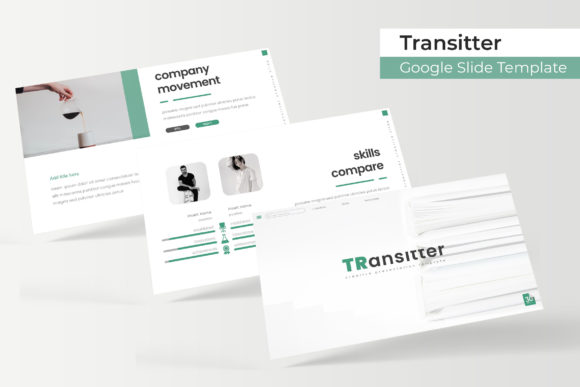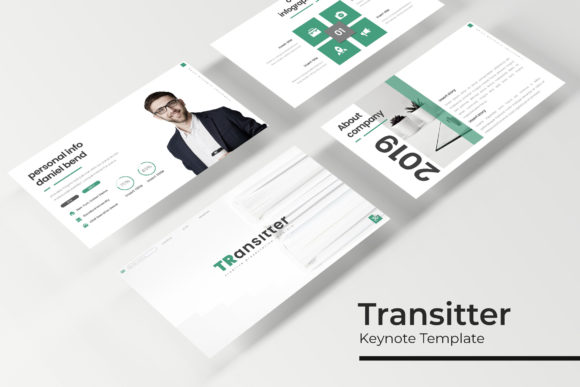
Transitter Keynote Template: Crafting Your Next Big Presentation
There is a specific kind of dread that sets in when you open a blank presentation slide. You have the data, you have the narrative, but the visual execution feels impossible. We have all sat through—and unfortunately created—presentations that look like an afterthought, cluttered with default styles and jarring color schemes. When you are pitching to investors, presenting a quarterly report, or teaching a workshop, the medium is often just as important as the message. A disjointed visual experience can distract your audience, while a cohesive, professional design builds trust before you even speak. This is where finding the right design assets becomes less about "pretty graphics" and more about strategic communication.
Beyond the Default: Why Your Slides Need Structure
The Transitter Keynote Template is designed to solve the "blank canvas" problem, but it does so with a level of sophistication that generic templates often miss. It is not just about filling space; it is about guiding the viewer's eye. With over 150 total slides included, the sheer volume of options ensures you are never forced to shoehorn your content into a layout that doesn't fit. The template is built on a foundation of 5 premade color themes, offering 30 distinct slides for each variation. This structure is vital for maintaining visual consistency. Whether you lean towards a dark, moody aesthetic for a creative pitch or a bright, clean look for a corporate overview, the color palettes are already balanced, saving you the headache of trying to match hex codes manually.
The Power of the Master Slide Workflow
If you have ever tried to resize an image only to have the entire slide layout break, you will appreciate the technical backbone of Transitter. It is built entirely on Master Slides. For the non-designer, this might sound like technical jargon, but the practical application is massive. It means that every element, from the placement of the text to the shape of the image placeholders, is governed by a central rule set. This ensures that if you decide to change a font or shift a color halfway through the deck, the changes ripple through automatically without you having to edit 50 individual slides. Furthermore, the "drag & drop" picture placeholders are a game-changer for efficiency. You don't need to be a Photoshop wizard to crop images perfectly; the template does the heavy lifting, ensuring pixel-perfect alignment every time.
Visual Storytelling with Handcrafted Infographics
Data is often the backbone of a presentation, but raw numbers can be numbing. This is where the handcrafted infographics within the Transitter Keynote Template shine. Instead of copying a basic bar chart from Excel, you have access to custom-designed visual representations of data. These aren't just decorative; they are functional tools for comprehension. When you are trying to explain market growth, workflow processes, or demographic breakdowns, a well-designed infographic can communicate in seconds what a paragraph of text takes minutes to explain. The inclusion of section break slides also helps in pacing your presentation. Just as a chapter break gives a reader a moment to breathe, a distinct section slide signals a shift in topic, keeping your audience mentally organized and engaged throughout the duration of your talk.
Practical Applications for Modern Professionals
While this is technically a presentation file, its utility extends far beyond a standard boardroom meeting. For small business owners and entrepreneurs, the Transitter template serves as a versatile hub for brand identity assets. You can utilize the gallery and portfolio slides to create a digital lookbook for your products. If you are a photographer, interior designer, or architect, these specific layouts allow you to showcase high-resolution imagery without the text overwhelming the visuals.
Consider the needs of a marketing professional or a content creator. You might use the slides to design a media kit that you send to potential partners. Because the graphics are resizable and editable, you can pull specific elements—like a unique timeline graphic or a stylized quote block—and repurpose them for social media assets. Imagine taking a single slide, exporting it as an image, and using it as an Instagram carousel or a Pinterest pin. This ability to repurpose assets ensures that your branding remains consistent across different platforms, from the keynote stage to the social media feed.
Streamlining Your Design Process
Time is a finite resource, especially for freelancers and agency designers juggling multiple clients. The value of a premium template lies in the time it buys back. The Transitter Keynote Template includes 5 PPTX files, specifically formatted for widescreen displays, which is the modern standard for projectors and monitors. The inclusion of a "Readme First" file and links to free fonts indicates a thoughtful approach to user experience. There is nothing more frustrating than opening a template to find that it relies on a proprietary font you don't own. By guiding you to free, high-quality typefaces, the template ensures your final output matches the preview without unexpected costs.
When selecting a design asset like this, think about your specific workflow. Do you frequently present case studies? The portfolio slides are your best friend. Are you a startup founder pitching for funding? The clean, infographic-heavy slides will help you narrate your growth story. The key is to treat the template not as a finished product, but as a toolkit. You are meant to break it apart, move things around, and make it yours. The pixel-perfect illustrations provided offer a modern, flat-design aesthetic that feels current and professional, avoiding the dated clip-art look that plagues so many corporate decks.
Making the Visuals Work for You
Ultimately, a tool is only as good as the person using it. When you adopt a robust system like the Transitter Keynote Template, you are setting a standard for your own work. It forces a level of organization; you have to prepare your images, write concise bullet points, and think about your narrative arc. The design is there to support that narrative, not overshadow it. Whether you are using it for an internal training session, a client-facing proposal, or a digital product launch, the goal is the same: clear communication. By leveraging the pre-built color variations and the master slide efficiency, you can focus less on the mechanics of design and more on the impact of your message.