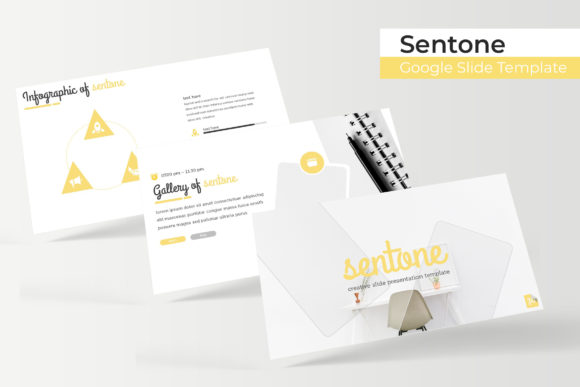
Senote Google Slide Template: Your Next Presentation Upgrade
You’ve been there. The pitch deck is due tomorrow, the client wants a "refresh," and you’re staring at a blank Google Slides file. You know the content is solid, but the delivery feels flat. A disjointed color palette, inconsistent iconography, and the same tired stock layouts aren't doing your ideas any justice. This is where a meticulously crafted design asset like the Senote Google Slide Template stops being a luxury and becomes a necessity. It’s not just about making things look pretty; it’s about creating a visual narrative that commands attention and communicates authority.
For entrepreneurs, designers, and content creators, the visual identity of a presentation is often the silent partner in a successful pitch. A cohesive brand identity extends beyond your logo and website—it must be present in every slide you share. The Senote Google Slide Template is engineered to bridge the gap between raw data and polished professionalism. With over 150+ total slides distributed across five premade color schemes, it offers a robust framework that respects both your time and your creative vision. Whether you are pitching investors, onboarding new team members, or showcasing a portfolio, the structure is already there, waiting for your content.
Crafting Visual Consistency with 150+ Slides
One of the most common pitfalls in presentation design is inconsistency. You start with one font style in the introduction, switch to another for the data charts, and end with a third for the conclusion. This fragmentation dilutes your brand recognition and can confuse your audience. The Senote Google Slide Template solves this by providing a unified design language across its massive library of layouts.
With 150+ total slides, you aren't just getting variety; you are getting a comprehensive toolkit. The collection is split into 5 premade color variations, with 30 slides for each template. This means you can instantly switch the entire mood of your presentation to match specific client branding or seasonal campaigns without manually tweaking every element. The transition from a deep, professional blue to a vibrant, energetic orange takes just a few clicks. This flexibility is vital for agencies and freelancers who manage multiple brands simultaneously. It ensures that your visual consistency remains rock solid, reinforcing your brand identity with every slide transition.
Master Slides and Pixel-Perfect Workflow
Efficiency in design is about working smarter, not harder. If you’ve ever spent hours trying to align text boxes or resize images manually, you know how frustrating presentation software can be. The Senote Google Slide Template is built on a Master Slides architecture, which is the industry standard for professional design assets.
What does this mean for you practically? It means that global changes are effortless. Want to change the font used across the entire deck? Do it once in the master slide, and it cascades to every single page. Need to update the footer or add a logo to the corner of every slide? A single edit handles it. Furthermore, the template features resizable and editable graphic picture placeholders. This drag-and-drop functionality allows you to insert your high-resolution images without worrying about cropping or distorting your visuals. The pixel-perfect illustrations ensure that your graphics remain crisp and clear, whether you are presenting on a massive conference screen or a laptop during a video call. This attention to technical detail saves you hours of troubleshooting and lets you focus on the narrative.
Infographics and Portfolio Presentation
Data can be dry. A wall of numbers or bullet points rarely excites an audience. However, when that data is visualized through handcrafted infographics, it becomes a story. The Senote Google Slide Template includes dedicated sections for infographics that transform complex metrics into digestible, engaging visuals. Whether you are mapping out a customer journey, displaying financial growth, or outlining a project timeline, these tools help improve audience engagement by making information accessible.
Beyond data, the visual presentation of your work matters immensely. For designers, photographers, and agencies, the gallery and portfolio slide options are essential. These layouts are designed to showcase your best work without distraction. The clean lines and ample whitespace allow your images to breathe, ensuring that the focus remains on your craftsmanship. Additionally, the inclusion of section break slides helps to pace your presentation. They act as visual "deep breaths," signaling to your audience that you are moving to a new topic, which aids in retention and keeps the viewer engaged throughout the entire deck.
Practical Applications for Branding and Marketing
A versatile template serves as a launchpad for numerous creative projects. While primarily designed for slides, the assets within the Senote Google Slide Template can be repurposed for broader marketing needs. The cohesive color palettes and typography choices make it an excellent reference point for broader brand identity work.
Consider the practical applications for your business or creative venture:
- Investor Pitches: Use the clean, professional layouts to build trust and convey competence.
- Social Media Content: Export specific slides or infographics as high-quality graphics for LinkedIn carousels or Instagram posts, ensuring your social media graphics match your presentation materials.
- Digital Products: If you create online courses or workshops, these slides provide the perfect framework for your educational content, enhancing the perceived value of your digital products.
- Internal Reports: Make quarterly reviews less tedious with structured, visually appealing data displays.
The ability to maintain readability is also a key feature. The layouts are designed with hierarchy in mind—headlines stand out, body text is legible, and call-to-action buttons are distinct. This ensures that your message isn't lost in a sea of visual noise, regardless of whether you are using the template for editorial design or internal communications.
What’s Included in Your Download?
Transparency is key when purchasing design assets. You need to know exactly what you are getting to plan your workflow. The package for the Senote Google Slide Template is comprehensive and ready to use immediately upon download.
Here is the breakdown of the deliverables:
- 5 PPTX Files (Standard PowerPoint format)
- 5 PPTX Widescreen files (optimized for modern displays)
- 5 premade color themes
- Readme First guide (essential for setup)
- Font used information with a free download link included
It is important to note that all photographs or pictures used in the preview are for illustration purposes only and are not included in the download. This is standard practice, as it ensures you have the freedom to insert your own high-quality, relevant imagery rather than being stuck with generic stock photos. The inclusion of the font used link ensures you can perfectly replicate the preview look without hunting for expensive typefaces.
Choosing the Right Template for Your Goals
Not every template fits every project, but a high-quality asset adapts to your needs. When selecting a presentation design, consider the "personality" of your brand. Are you corporate and serious, or creative and playful? The Senote Google Slide Template strikes a balance, offering a modern, clean aesthetic that can lean professional or creative depending on the images and text you inject.
When you download this asset, take the time to review the Readme First file. It often contains crucial instructions on how to install the fonts to ensure the text renders correctly. Without the proper fonts, even the best layout can look disjointed. By following the setup guide, you ensure that your visual consistency is maintained from the moment you open the file.
Ultimately, the goal of any design asset is to remove friction from the creative process. By providing a structured, pixel-perfect foundation, this template allows you to focus on what truly matters: your message. Whether you are a small business owner preparing for a growth phase or a marketer launching a new campaign, having a reliable, professional presentation toolkit is an investment in your brand's future.