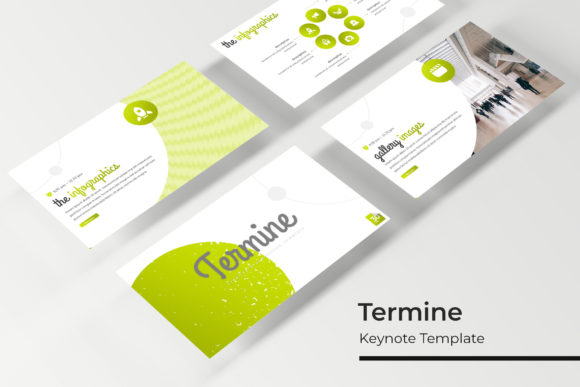
Termine Keynote Template: Designing with Confidence
Every great idea deserves a presentation that commands attention. Whether you're pitching a new service, showcasing a portfolio, or outlining a complex strategy, the tools you use shape how your audience receives your message. The Termine Keynote Template is built for professionals who need a polished, versatile framework without spending hours on slide design. With over 150 total slides across five premade color schemes, it offers a substantial library of layouts that adapt to diverse projects—from corporate briefings to creative showcases.
A Foundation for Visual Consistency
One of the biggest challenges in presentation design is maintaining a cohesive look throughout. Termine solves this by organizing 30 unique slides into each of its five color templates. This structure ensures that every slide—from section breaks to portfolio galleries—follows a unified visual language. The color variations aren't just recolored copies; each palette is thoughtfully curated to evoke different moods, whether you're aiming for energetic vibrancy or subdued professionalism. This level of detail helps reinforce brand recognition, especially when your presentation needs to align with existing marketing materials or brand guidelines.
The template includes handcrafted infographics, which are particularly useful for translating data into digestible visuals. Instead of relying on generic chart styles, these infographics are designed to integrate seamlessly with the overall aesthetic. For small business owners or marketers, this means you can present statistics, timelines, or process flows without breaking the visual flow of your deck. The section break slides also provide clear visual cues, helping your audience follow the narrative arc of your presentation.
Practicality Meets Creative Flexibility
Beyond its aesthetic appeal, the Termine Keynote Template is built for real-world efficiency. Every graphic element is resizable and editable, allowing you to adjust sizes, colors, and positions without distortion. The drag-and-drop picture placeholders streamline the process of adding images, which is a significant time-saver for content creators or entrepreneurs managing multiple projects. Since the template is based on master slides, making global changes—like updating a logo or adjusting color schemes—takes just a few clicks. This master-slide architecture ensures pixel-perfect illustrations and text alignment across all slides, eliminating the frustration of manually fixing inconsistencies.
The template's versatility extends to various professional contexts. For branding projects, you can use the gallery and portfolio slides to showcase visual identity systems, packaging mockups, or social media campaigns. Marketers might leverage the infographic slides to break down campaign metrics or customer journey maps. Even for internal use, such as team training or project updates, the structured layouts help communicate information clearly and professionally. The widescreen format is optimized for modern displays, ensuring your content looks sharp in conference rooms or on virtual meeting platforms.
Integrating Termine into Your Workflow
Getting started with the Termine Keynote Template is straightforward. The package includes five PPTX files, each corresponding to a color variation, along with a Readme file that outlines installation steps and font details. The template uses a free font, and a download link is provided, so you won't need to purchase additional typefaces to maintain the design's integrity. This is particularly helpful for startups or freelancers who need to manage budgets carefully while still achieving a high-end look.
When incorporating the template into your projects, consider how its visual style aligns with your goals. The modern typography and clean layouts are well-suited for industries like tech, consulting, or creative services. However, the editable nature of the slides means you can easily adapt them for other contexts—like educational workshops, event proposals, or product launches. Experiment with the color palettes to match your brand's existing identity, or use the infographics to simplify complex information for your specific audience.
Beyond the Slides: Broader Design Applications
While the Termine Keynote Template is primarily designed for presentations, its design elements can inspire other creative work. The handcrafted infographics, for example, could be adapted for use in social media graphics or blog visuals. The color palettes might serve as a starting point for developing a broader brand color system. For designers, studying the layout principles within the template—such as balance, hierarchy, and whitespace—can provide insights into effective visual communication that extend beyond slide decks.
It's worth noting that the template does not include the photographs or images used in its preview. This is standard practice, as it allows you to insert your own visuals that are relevant to your content. When selecting images, aim for high-resolution files that complement the template's aesthetic. Consistent image treatment—like using similar filters or color tones—can further enhance the professional feel of your presentation.
Final Thoughts on Choosing Your Presentation Toolkit
Selecting a presentation template is about more than just aesthetics; it's about finding a tool that supports your workflow and communication goals. The Termine Keynote Template offers a robust set of features—150+ slides, multiple color schemes, editable graphics, and master-slide efficiency—that cater to both design quality and practical usability. Whether you're a entrepreneur pitching investors, a designer showcasing client work, or a marketer presenting quarterly results, having a reliable template can reduce stress and elevate the overall impact of your message.
As you explore the Termine template, take time to customize it thoughtfully. Adjust the color variations to reflect your brand's personality, replace placeholder text with your own narrative, and use the infographic slides to make data-driven points more engaging. By leveraging the template's flexibility and professional design, you can create presentations that not only look impressive but also communicate your ideas with clarity and confidence.