Transform Photos into Art with Art Stick Photo Manipulation
Ever look at a stunning, painterly image online and wonder how the creator achieved that effect? Maybe it was a portrait with a textured, artistic finish or a landscape that felt like a canvas painting. For many designers, content creators, and small business owners, achieving that polished, artistic look on photos can be time-consuming, requiring advanced software skills and a lot of manual work. That's where specialized tools come in, designed to streamline the creative process and deliver professional results quickly. One such tool is Art Stick Photo Manipulation, a set of PSD templates that turn ordinary photos into artistic compositions with surprising ease.
What Exactly is Art Stick Photo Manipulation?
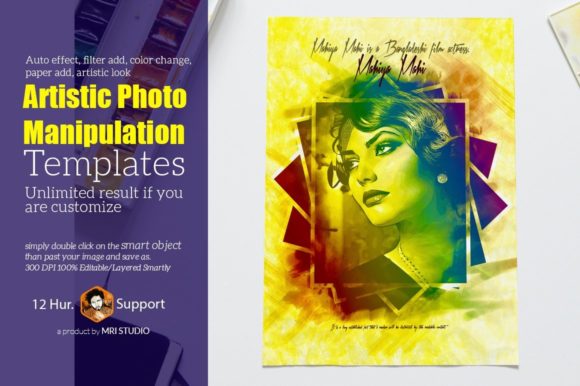
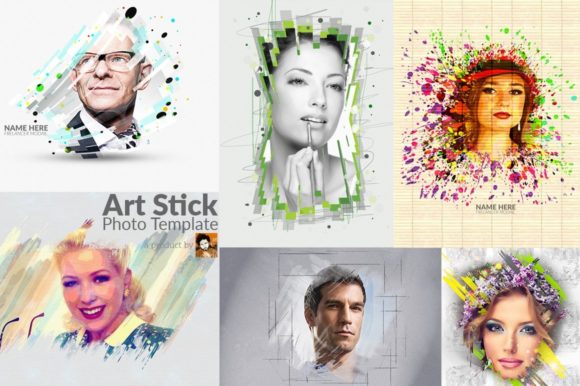
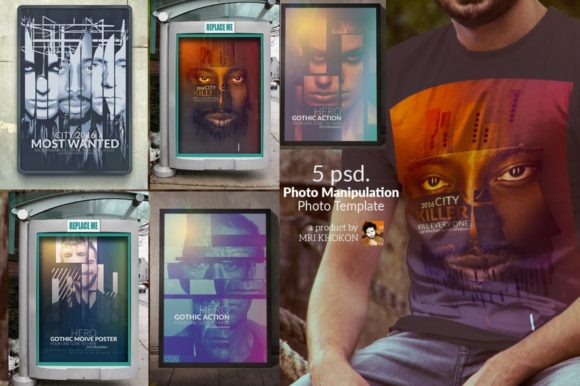
At its core, Art Stick Photo Manipulation is a collection of five high-resolution PSD (Photoshop Document) files. Think of them as sophisticated digital mock-ups, but instead of placing a logo on a t-shirt, you're placing your photo into a pre-designed artistic scene. The "art stick" concept refers to the artistic treatment applied to your image—like having a digital paintbrush and palette at your fingertips without needing to be a painter. Each template is 3000x4000 pixels at 300 DPI, making them perfectly suitable for both digital displays and high-quality print projects. The color mode is RGB, which is standard for screens, but with such high resolution, they can be adapted for print with proper conversion.
The Magic of Smart Objects: Your Photo, Instantly Artistic
The real power and the reason designers and creators love this product lies in its use of Smart Objects. If you've used Photoshop mock-ups before, you're familiar with the concept. A Smart Object is a layer that acts like a container. For these templates, it's the designated area where you place your photograph.
Here’s the practical, time-saving workflow:
- Open the PSD file in Adobe Photoshop (compatible with CS3 through CC).
- Locate the Smart Object layer (usually clearly labeled in the layers panel).
- Double-click the Smart Object thumbnail—this opens a new tab or window.
- Place your photo into this file, resize it to fit, and save (Ctrl+S / Cmd+S).
- Return to the main template file. Your photo will now be automatically integrated into the artistic scene, complete with all the pre-designed effects, filters, color grading, textures, and arrangements.
It’s almost like an action that runs itself once you drop in your image. The "auto manipulation arrangement," "auto effect filter add," and "color change" features described in the product are baked into the template layers. You don't have to manually apply filters or blend modes; the template has done that work for you. This is a massive advantage for those who need consistent, artistic visuals but lack the time or expertise for complex photo editing in Photoshop.
Practical Uses: Where This Artistic Style Shines
The painterly, textured look achieved by Art Stick Photo Manipulation isn't just a novelty. It serves specific strategic purposes in visual communication. This style can evoke emotion, add a premium feel, and create a distinctive brand aesthetic. Consider these applications:
- Social Media Graphics: Stand out in a crowded feed with images that look like curated art pieces, perfect for Instagram posts, Facebook ads, or Pinterest pins for artists, coaches, or lifestyle brands.
- Website Hero Images & Blog Headers: Use an artistic photo manipulation as a background for a key headline. It adds depth and visual interest that a standard stock photo often lacks.
- Digital Product Mockups: Showcase your work—be it photography, graphic design, or even written content—inside an artistic frame. This is great for selling prints, courses, or e-books.
- Brand Identity Elements: For brands that want to communicate creativity, craftsmanship, or a human touch (like a boutique bakery, a yoga studio, or an independent publisher), this style can be used for profile pictures, about-page images, or marketing collateral.
- Invitations & Greeting Cards: The artistic, paper-textured finish included in the templates makes them ideal for creating unique digital or printed invitations for events, weddings, or special announcements.
- Editorial & Poster Design: The high resolution supports large-format printing for magazine covers, article spreads, or promotional posters where a classic, artistic vibe is desired.
Customization and Creative Control
While the templates provide a stunning one-click effect, they are not rigid. The product emphasizes that it's 100% Editable/Layered and "Smartly Organized & Grouped." This means once your photo is in place, you can dive deeper if you wish. You might adjust the opacity of the texture overlay, tweak the color balance of the effect, or modify the background. This layer of customization is what turns a good template into a versatile design asset. You're not locked into one look; you can start with the automated result and refine it to perfectly match your project's color palette or mood, yielding "unlimited results."
Pairing This Style with Typography
When using such a distinctive visual style, your choice of typeface becomes crucial for maintaining balance and readability. The product notes the use of the Lato font, a popular, clean sans-serif. This is a smart choice because its neutrality and excellent legibility prevent it from competing with the detailed, artistic imagery. For your own projects, consider this principle:
- For headlines or logos paired with Art Stick imagery, a simple, bold sans-serif (like Lato, Montserrat, or Open Sans) or a classic serif (like Playfair Display or Merriweather) can provide a strong anchor.
- Avoid overly decorative script or handwritten fonts for body text, as they can become lost against a textured background. Save them for short, impactful accents if needed.
- Always test readability at the size it will be viewed. Place your text over the busiest part of the manipulated photo to ensure sufficient contrast.
The goal is to let the artistic photo manipulation be the star while your typography supports it with clarity and style, contributing to a cohesive brand identity.
Is This the Right Tool for You?
Art Stick Photo Manipulation PSD Templates are a specialized design asset. They excel when you need to produce a high volume of artistic visuals consistently and efficiently. If you're a content creator who needs unique featured images weekly, a small business owner creating your own marketing materials, or a designer looking for a time-saving effect to offer clients, this type of template can be invaluable.
It's important to remember this is a photo mock-up system, not a general-purpose font or a set of brushes. Its value is in transforming your specific photographs. Before purchasing, ensure you have a working knowledge of basic Photoshop operations, particularly using Smart Objects. The included help guide is a plus, but comfort with the software is key.
Ultimately, the appeal of tools like this lies in democratizing design. They allow individuals and small teams to achieve a level of visual polish that might otherwise require outsourcing to a specialist. By providing a structured yet flexible way to apply complex artistic effects, Art Stick Photo Manipulation helps bridge the gap between a standard snapshot and a piece of visual communication that captures attention and conveys a distinct, creative personality.