Zero-G Power Point Template: A Launchpad for Modern Presentations
There’s a specific kind of frustration that hits when you open a blank PowerPoint slide. You have a brilliant idea, a tight deadline, and a clear message to deliver, but the default layouts feel sterile and uninspired. You spend hours dragging boxes, adjusting alignments, and wrestling with color palettes only to end up with something that looks... amateur. If you’ve ever felt that your presentation design is holding back your message, it’s time to look at tools built for the modern creative. The Zero - G Power Point Template isn’t just another set of slides; it’s a comprehensive design system engineered to help you present your ideas with the clarity and impact they deserve.
Beyond the Default: What Makes This Template System Stand Out
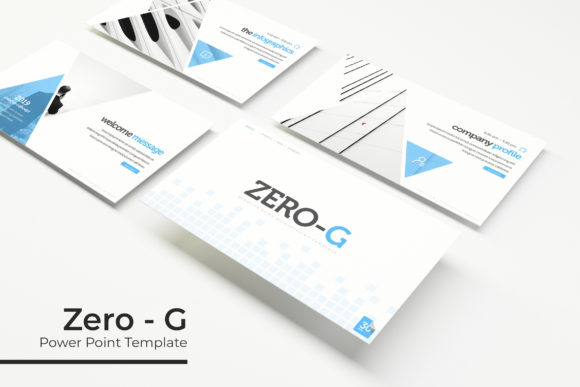
At its core, the Zero-G template is built on a philosophy of sophisticated minimalism. The name suggests weightlessness, and the design delivers—a clean, airy aesthetic that uses negative space to guide the viewer’s eye. This isn’t about flashy animations or distracting clip art. It’s about professional-grade modern typography and pixel-perfect layout that instantly elevates your content. The visual appeal lies in its versatility; the design is sleek enough for a tech startup pitch yet elegant enough for a creative agency portfolio.
The true power, however, is in its structure. With 150+ total slides across five premade color themes, you’re not just buying a single look—you’re acquiring a premium font and design toolkit. Each color variation offers 30 meticulously crafted slides, giving you a consistent yet flexible foundation. Whether you’re presenting quarterly financials or a new product line, the design system ensures your visuals remain cohesive from the first slide to the last. This level of visual consistency is what separates a good presentation from a great one, building brand recognition and professional presentation quality with every click.
Practical Applications for Real-World Projects
Let’s move beyond theory. How does a template like this function in your daily workflow? For the entrepreneur, it’s a rapid deployment tool for investor decks and sales pitches. Instead of starting from scratch, you select a color theme that aligns with your brand identity and populate the slides with your data. The handcrafted infographics are particularly valuable here. They transform complex statistics into digestible, engaging visuals, helping you tell a compelling story with your numbers. This directly improves audience engagement and ensures your key metrics are understood, not just seen.
For designers and marketing professionals, the template serves as a powerful design asset. The gallery and portfolio slides are perfectly formatted to showcase work, whether it’s logo design, packaging design, or social media graphics. The picture placeholder feature is a game-changer for workflow efficiency. You can literally drag and drop your high-resolution images into pre-sized frames, maintaining perfect composition without manual adjustments. This is ideal for creating client presentations, project proposals, or even internal mood boards. The section break slides provide clear visual punctuation, helping you structure a long-form presentation logically and keep your audience oriented.
Maximizing Your Design Workflow and Output
Getting the most out of the Zero-G system requires a strategic approach. First, consider your project’s goal. Are you aiming for a bold, energetic feel or a calm, authoritative tone? The five premade colors are your starting point. Choose the palette that best resonates with your message. Next, leverage the master slides. Every element in the template is built on this foundation, which means you can make global changes—like adjusting a font style or accent color—across all 150+ slides with a single edit. This ensures visual consistency and saves an immense amount of time during revisions.
The included readme first file and free font download link are crucial. Typography is the backbone of design. The fonts paired with this template were chosen for their excellent readability and modern character. Take the time to install them and understand their personality—whether it’s a clean sans serif font for body text or a distinctive display font for headlines. This attention to typographic detail is what gives your presentation a polished, professional edge. Furthermore, the fact that all graphics are resizable and editable means you can adapt elements to fit specific content needs without losing quality, a common pitfall with lesser templates.
From Presentation to Full Brand Ecosystem
An often-overlooked advantage of a high-quality presentation template is its potential to seed a broader visual language. The color schemes, typographic hierarchy, and infographic styles within the Zero-G template can inform your other marketing assets. Use the color codes for your website or social media profiles. Let the infographic style guide how you present data in a blog post or a PDF report. This creates a seamless brand identity across all touchpoints, from a live presentation to your digital products and print materials.
For content creators and bloggers, this template can be repurposed in surprising ways. The slide layouts can be adapted for creating compelling social media graphics or even the interior pages of a digital product like an ebook or a workshop manual. The section break slides can become chapter dividers, and the portfolio slides can beautifully display photography or craft projects. The key is to see the template not as a rigid structure, but as a flexible collection of design assets that can be deconstructed and recombined to serve your unique creative vision. Always review the specific commercial licensing terms included to ensure your intended use, whether for client work or personal projects, is fully covered.