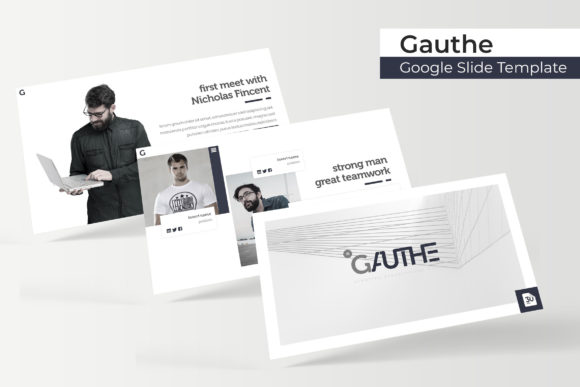
Gauthe Google Slide Template: A Modern Design System for Professionals
There’s a particular kind of frustration that hits when you open a blank presentation file. You know the content is strong, you have the data, and you have the message, but the visual execution feels flat. For designers, marketers, and entrepreneurs, the gap between a good idea and a polished presentation often comes down to the tools used to build it. The Gauthe Google Slide Template isn't just another set of pre-made slides; it is a comprehensive design ecosystem built to eliminate that friction. By combining a robust library of assets with a focus on modern typography and user-friendly editing, Gauthe offers a solution for anyone needing to communicate ideas with clarity and style.
Visual Appeal Rooted in Modern Typography
What sets this template apart is its reliance on modern typography to drive the design narrative. Too often, templates rely on heavy graphics that distract from the message. Gauthe takes a different approach, utilizing clean lines and ample white space to let the content breathe. The aesthetic is distinctly contemporary—think sharp sans-serif pairings balanced with elegant serif accents. This creates a look that feels premium without being pretentious. For a small business owner pitching to investors or a content creator outlining a strategy, this visual language signals competence and attention to detail immediately.
The structure of the Gauthe Google Slide Template is designed for visual consistency. With 150+ total slides distributed across 5 premade colors, you aren't just getting random layouts; you are getting a cohesive brand identity system. Each of the 5 color variations offers 30 slides, ensuring that whether you are working on a quarterly report or a creative portfolio, the look remains uniform. This level of consistency is crucial for brand recognition. When your audience sees the same color palette and typographic rhythm throughout your deck, it builds trust and makes your message more memorable.
Practical Features for Real-World Workflows
For the busy professional, efficiency is just as important as aesthetics. The Gauthe template is built on Master Slides, which is the backbone of any efficient presentation workflow. This means that changes made to the master slide automatically propagate throughout the deck, saving hours of manual adjustment. Furthermore, the resizable and editable graphic picture placeholders utilize a simple drag & drop interface. You don't need to be a PowerPoint wizard to swap out images or resize charts. This accessibility makes it an ideal design asset for teams where multiple people might be contributing to the final output.
The inclusion of handcrafted infographics is a significant value-add. Data visualization is often the hardest part of a presentation to get right. Instead of struggling with Excel charts that don't match your aesthetic, Gauthe provides pixel-perfect illustrations that are already styled to fit the template's theme. Whether you need to display a timeline, a process flow, or comparative statistics, these infographics allow you to present complex data in a digestible and visually pleasing way. This is particularly useful for marketing assets where data needs to tell a story.
Beyond the Slide Deck: Creative Applications
While the primary function of the Gauthe Google Slide Template is presentations, its utility extends far beyond the conference room. Because the files are delivered in both PPTX widescreen and standard formats, they can be repurposed for a variety of creative projects. Consider using the section break slides as standalone graphics for social media. The bold typography and clean layouts make for excellent Instagram stories or LinkedIn posts. You can easily export individual slides as images to create social media graphics that maintain your brand's professional look.
For those involved in editorial design or digital publishing, the layout options within the template can serve as a blueprint for web design or blog layouts. The grid systems used in the gallery and portfolio slides are transferable concepts for designing website wireframes or packaging design mockups. Even for print materials, such as posters or invitations, the high-contrast color schemes and scalable vector elements ensure that your designs look sharp whether viewed on a screen or printed on paper. It’s a versatile toolkit for creative entrepreneurs who need to pivot quickly between different mediums.
Customization and Typography Strategy
Effective visual communication requires more than just pretty pictures; it requires a strategy for readability. The Gauthe template includes a readme first file and links to free fonts, ensuring you can replicate the exact look of the preview. However, the real power lies in how you adapt these typefaces. The template uses a balanced hierarchy—typically a bold display font for headlines and a clean, legible sans serif font for body text. This pairing is essential for readability, especially in long-form presentations or editorial layouts.
When customizing the template, consider the personality of your project. If you are designing for a luxury brand, you might swap the body font for a refined serif font to evoke tradition. Conversely, for a tech startup, a geometric sans-serif might better convey innovation. The template’s structure allows for these adjustments without breaking the layout. Always test your font pairings on multiple slides to ensure they hold up in different contexts, such as dark backgrounds or image overlays. This attention to typographic detail elevates a standard presentation into a premium font showcase.
What’s Included in the Package
To ensure you can get started immediately, the download package is comprehensive. You will receive 5 PPTX files corresponding to the different color schemes. The package also includes the necessary font download links, so you don't have to hunt for the right typeface. It is important to note, as stated in the file description, that while the Gauthe Google Slide Template provides the structure and graphics, the photographs used in previews are for illustration purposes only and are not included. This is standard practice for design assets, allowing you to insert your own high-resolution imagery that is relevant to your specific brand identity.
For anyone looking to streamline their design process, the Gauthe system offers a blend of aesthetic appeal and functional practicality. It is a tool designed not just to make things look good, but to help you communicate more effectively, whether you are a designer building a client deck or a blogger creating a media kit.