Hexone Google Slide Template: A Deep Dive into Modern Presentation Design
Let's be honest: we've all sat through presentations that felt like a chore to both create and watch. The default templates are tired, the layouts are uninspired, and the final product often fails to capture the energy or professionalism of the idea it's trying to convey. This is where a thoughtfully designed asset like the Hexone Google Slide Template enters the picture. It's not just a collection of slides; it's a structured system built for clarity, visual impact, and efficiency, designed for anyone who needs to communicate ideas with confidence and style.
Beyond the Basics: What Makes a Presentation System Truly Work?
The core strength of any premium design asset is its foundation. The Hexone Google Slide Template is built upon Master Slides, a feature that might sound technical but is the secret to consistent, professional-looking presentations. Instead of manually formatting each slide, you work from a pre-designed blueprint. This ensures every header, body text box, and graphic element aligns perfectly across all 150+ slides. For a small business owner updating a quarterly report or a marketer preparing a client pitch, this means less time fiddling with alignment and more time refining the message. The pixel-perfect illustrations and resizable, editable graphics are not just decorative; they are functional tools that maintain their quality whether you're projecting on a large screen or sharing a PDF, preventing that all-too-common blurry image disaster.
A Palette for Every Project: The Power of Five Premade Colors
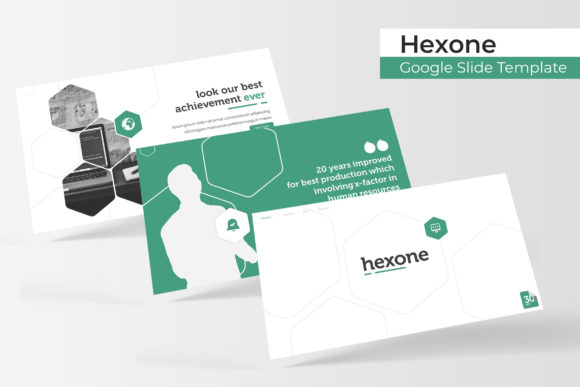
Color is the first thing your audience registers, often before they read a single word. The Hexone template acknowledges this by offering five distinct premade color variations, each with 30 dedicated slides. This isn't a simple color-swap filter; it's a thoughtfully curated palette where each color scheme has been adjusted to ensure proper contrast and visual harmony. Imagine you're a freelance designer presenting branding concepts to a client in the wellness industry. You can select the soft, natural green variation to evoke calm and growth. Later that day, for a tech startup pitch, you switch to the bold, high-contrast blue scheme to communicate innovation and trust. This flexibility allows the same powerful framework to adapt to vastly different brand identities, making it a versatile tool in a creative professional's toolkit. The included handcrafted infographics and section break slides within each color set provide ready-made solutions for complex data and narrative flow, turning statistics into stories.
From Screen to Print: Practical Applications for Modern Creators
The true test of a design asset is its real-world utility. The Hexone Google Slide Template, with its clean lines and modern typography, seamlessly bridges the gap between digital and physical projects. Consider these applications:
- Brand Identity & Marketing: Use the consistent slide layouts to create a cohesive brand deck. The typography and graphic styles can directly inspire matching social media graphics, website headers, or even print materials like posters and flyers, ensuring visual consistency across all touchpoints.
- Editorial & Content Creation: Bloggers and content creators can repurpose presentation slides into engaging blog post headers, Instagram carousels, or YouTube video intros. The portfolio and gallery slides are perfect for showcasing a collection of work, from photography to product lines.
- Education & Training: The clear section breaks and infographic slides are ideal for educators, trainers, or HR professionals developing internal materials. The drag-and-drop picture placeholder makes it easy to incorporate team photos, diagrams, or product images without disrupting the layout.
- Entrepreneurial Pitches: For entrepreneurs, a polished pitch deck is non-negotiable. The structured slides guide you through telling your story—from problem to solution to financials—in a logical, visually engaging sequence that holds investor attention.
Making It Your Own: Practical Tips for Customization
While the template provides a professional starting point, its real power is unlocked through thoughtful customization. The key is to use the system as a guide, not a cage. Start by selecting the color variation that best aligns with your project's mood. Then, focus on the content. Use the provided picture placeholders by simply dragging and dropping your own images. If a specific infographic doesn't quite fit your data, edit the shapes and text on the Master Slide to create a new version that does. This approach saves hours compared to building from scratch.
A crucial, often overlooked step is testing your typography. While the template includes a recommended free font, always preview your presentation on the actual device or projector you'll use. Check for readability from the back of the room. Ensure your key points are legible and that the font pairing you've chosen (perhaps using the template's sans-serif for body text and a contrasting serif for headlines) enhances rather than hinders comprehension. Remember, the goal is clarity, not just style.
The Final Slide: More Than Just a File
Ultimately, the Hexone Google Slide Template is a presentation framework designed to reduce friction in the creative process. It acknowledges that professionals and creators need tools that are both beautiful and brutally functional. The inclusion of five PPTX files for widescreen formats, along with a clear readme and font information, shows an understanding of the practical workflow. It’s a resource that respects your time by handling the heavy lifting of layout and consistency, freeing you to focus on what truly matters: your message, your story, and your audience. Whether you're finalizing a business plan, designing a workshop, or creating a visual portfolio, having a reliable system like this can transform a daunting task into a streamlined, even enjoyable, part of your creative work.