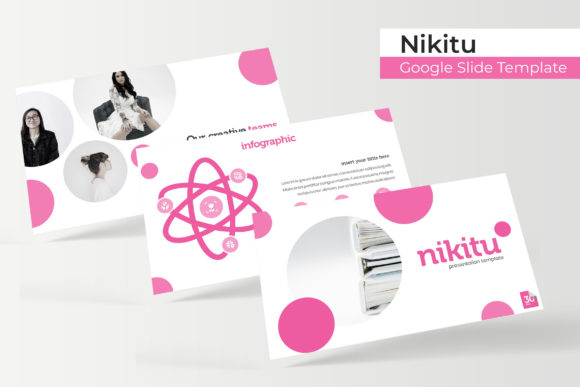
Nikitu Google Slides: A Versatile Template for Modern Presentations
Building a presentation that looks polished, professional, and visually engaging can be a time-consuming challenge. Whether you're pitching to investors, onboarding new team members, or sharing project updates, the visual foundation of your slides matters. A disjointed or poorly designed deck can distract from your message, while a cohesive, well-structured template can enhance clarity and leave a lasting impression. This is where a resource like the Nikitu Google Slide Template comes into play, offering a comprehensive toolkit for anyone looking to streamline their presentation design process.
What Makes the Nikitu Template Stand Out?
At its core, the Nikitu template is a collection of 150+ total slides, organized into five distinct, premade color themes. Each color variation contains 30 slides, giving you a rich starting point for any presentation scenario. The design philosophy here is practical and modern. The slides are built on master slides, which means every element—text boxes, shapes, icons, and image placeholders—is fully editable and resizable. This isn't a static PDF; it's a dynamic framework you can adapt to your specific branding and content needs.
The visual appeal lies in its clean layouts and handcrafted infographics. Instead of generic clipart, you get thoughtfully designed charts, timelines, diagrams, and process flows that help translate complex data into digestible visuals. The inclusion of section break slides and dedicated gallery and portfolio layouts makes it particularly useful for creatives and agencies who need to showcase work visually. The pixel-perfect illustrations ensure that your graphics look sharp on any screen, from a laptop to a large projection display.
Practical Applications Across Industries
The versatility of this template suite makes it a valuable asset for a wide range of professionals and projects. Its structure supports both corporate and creative needs seamlessly.
For small business owners and entrepreneurs, it serves as a foundation for pitch decks, business plans, and quarterly reviews. The consistent color themes help reinforce brand identity across multiple presentations. Marketers and content creators can leverage the infographic slides to present campaign results, social media analytics, or content calendars in a visually compelling way. The drag-and-drop image placeholders make it easy to insert screenshots of social media posts or website analytics without fussing with alignment.
Designers and agencies will find the gallery and portfolio slides particularly useful. Presenting case studies, mood boards, or design iterations becomes straightforward. The clean, minimalist aesthetic ensures the showcased work remains the focal point. For educators and trainers, the template's logical flow and variety of diagram options can help structure course materials, workshop agendas, or training modules that are easy for learners to follow.
Even for personal projects, like planning a wedding, organizing a community event, or creating a family photo slideshow, the template's simplicity and visual clarity make it accessible. The five premade color palettes offer enough variety to suit different tones—from professional blues and greens to more vibrant, creative hues.
Enhancing Your Workflow and Visual Consistency
One of the most significant advantages of using a well-structured template like Nikitu is the efficiency it brings. Starting from a blank slide is daunting. Having a library of pre-designed layouts—from title slides and quote slides to team bios and data comparison charts—eliminates the "blank page" problem. You can quickly assemble a professional-looking deck by selecting and duplicating the slides you need.
Visual consistency is crucial for brand recognition and professionalism. The master slide system ensures that fonts, colors, and alignment remain uniform throughout your presentation. When you change a color in the master theme, it updates across all slides, saving you from tedious manual adjustments. This consistency extends to your infographic elements; using the same style of chart or icon throughout reinforces a cohesive look, making your data easier to interpret and your overall message more credible.
The pixel-perfect nature of the illustrations also means you won't encounter blurry or poorly scaled graphics when presenting. This attention to detail reflects on you and your business, signaling care and quality in your communication materials.
Getting Started and Maximizing the Asset
The package includes five PPTX files, each corresponding to a different color theme, in widescreen format. A "Readme First" document and links to download the free fonts used in the template are also provided, ensuring you can replicate the exact look shown in the previews. It's important to note that the preview photographs are for illustration only and are not included in the download—this is standard practice, as you'll want to insert your own images.
To get the most out of this resource, start by exploring all the slides in each color theme to understand the range of layouts available. Don't feel confined to using a single theme for one presentation. You might find that the "Gallery" slides from one color work best for your portfolio, while the "Infographic" slides from another are perfect for your data. Mix and match elements across the files to suit your project.
Before you begin, take a moment to plan your presentation's narrative. What is the key message? Who is the audience? Then, select the slides that best support that story. Use the infographic slides to simplify complex information, the section breaks to create clear transitions, and the portfolio slides to provide visual proof of concepts. Always replace the placeholder images with your own high-quality photographs or graphics to maintain authenticity and relevance.
Finally, remember that a template is a starting point, not a finished product. Customize the colors to match your brand's hex codes, adjust the font sizes for readability in your specific venue, and rearrange elements to fit your unique content flow. By treating the Nikitu template as a flexible toolkit, you can create countless presentations that are both efficient to produce and impressive to deliver.