Opinium: A Comprehensive PowerPoint Template for Modern Brands
Creating a presentation that truly captures attention involves more than just throwing text onto a slide. It requires a cohesive visual strategy that reflects your brand’s personality and keeps your audience engaged from the first click to the final Q&A. For anyone who has spent hours wrestling with default slide layouts, the search for a solution that balances aesthetic appeal with practical functionality is a familiar one. This is where a thoughtfully designed asset like the Opinium PowerPoint template comes into play, offering a structured yet flexible foundation for your visual storytelling.
Beyond Basic Slides: The Anatomy of a Cohesive Presentation System
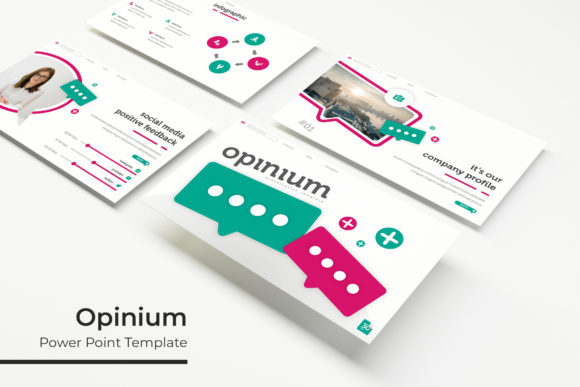
What sets a premium presentation template apart is its ability to function as a complete design system. The Opinium template is built on this principle, featuring over 150 total slides. This isn't just a collection of random layouts; it's a curated library organized into five distinct premade color themes. Each theme provides 30 meticulously crafted slides, ensuring you have the right layout for any type of content—be it a data-driven quarterly report, a product launch narrative, or a creative portfolio review. The inclusion of dedicated section break slides helps organize your story into clear, digestible chapters, guiding your audience seamlessly through complex information.
For designers and marketers, the value lies in the details that save time and elevate quality. The slides are based on master slides, which means global changes to fonts, colors, or logos can be applied in seconds, maintaining absolute visual consistency across every page. The graphics are pixel-perfect and fully resizable, so you can scale an infographic or diagram without losing sharpness. Furthermore, the picture placeholders are designed for drag-and-drop functionality. Simply drag your image from a folder into the placeholder, and it automatically crops and fits to the designated shape, whether it's a circle, rectangle, or a custom silhouette. This feature alone can cut assembly time in half, allowing you to focus on refining your message rather than technical formatting.
Practical Applications Across Industries
The true test of a design asset is its versatility. The Opinium template, with its clean, modern aesthetic and handcrafted infographics, serves a wide range of professionals and projects. Consider how these features translate into real-world use:
- Entrepreneurs and Small Business Owners: Quickly assemble investor pitches, business plans, or client proposals that look polished and professional. The consistent color themes help reinforce brand recognition from the very first slide.
- Marketing and Content Teams: Develop campaign recap presentations, social media strategy decks, or content calendars. The portfolio and gallery slides are perfect for showcasing past work or visual assets in a compelling way.
- Educators and Trainers: Create engaging workshop materials, online course modules, or lecture series. The variety of infographic slides—such as timelines, process flows, and comparison charts—can transform abstract concepts into clear, visual learning aids.
- Freelance Designers: Use the template as a starting point for client projects, significantly speeding up the initial design phase. The included "Readme First" file and font links (using free fonts) make it easy to hand off a complete, editable package.
Think about a local bakery owner preparing a presentation for a potential wholesale partner. Instead of generic clipart, they can use the portfolio slides to display high-quality images of their products, use an infographic to illustrate their production timeline, and apply a warm, inviting color theme that matches their shop's branding. The result is a presentation that tells a cohesive brand story, not just a list of facts.
Integrating the Template into Your Brand Workflow
Adopting a new template into your workflow is most effective when done intentionally. Start by selecting one of the five premade color themes that most closely aligns with your existing brand palette. If the colors are a close match, you may only need to make minor adjustments. If they are a starting point, use the master slides to input your exact brand hex codes. This establishes your visual foundation.
Next, consider your typography. While the template includes recommended free fonts for a ready-to-use experience, you can substitute them with your own brand typefaces. A good practice is to maintain the hierarchy established in the template—using a bold, clean font for headings and a highly readable sans-serif for body text. This ensures your slides remain accessible and easy to scan, even from the back of a room. Always test your final presentation on the actual display you'll use, as colors and text size can appear differently on a projector versus a laptop screen.
The handcrafted infographics are a standout feature for data presentation. Rather than using them as-is, take a moment to customize them. Change the iconography to match your industry, adjust the data points to reflect your latest metrics, and ensure the color accents align with your theme. This transforms a generic chart into a proprietary visual asset for your brand. Remember, the goal is not to use every slide, but to select and adapt the ones that best serve your specific narrative. A powerful presentation is often one that uses white space effectively and doesn’t overwhelm the viewer with too many elements on a single slide.
Ultimately, tools like the Opinium template are designed to remove technical barriers, freeing you to concentrate on strategy and storytelling. By leveraging its structured system of slides, infographics, and design features, you can produce presentations that are not only visually striking but also deeply aligned with your brand's identity and communication goals. The result is a more professional, engaging, and memorable experience for your audience.