Renato Power Point Template: A Deep Dive into Its 150+ Slides
You’re staring at a blank PowerPoint slide again, the cursor blinking mockingly. You know what you want to say, but the visual execution feels flat. Whether you're pitching a new client, presenting quarterly results to stakeholders, or launching a product, the visual weight of your presentation matters just as much as the data within it. This is where many professionals hit a wall—finding a template that balances aesthetic appeal with functional depth. Enter the Renato Power Point Template, a comprehensive design asset built for those who refuse to settle for generic visuals.
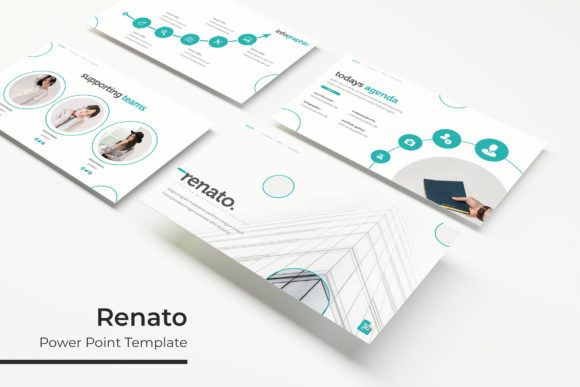
At its core, Renato is a powerhouse of organization and style. It isn't just a single file with a few headers and bullet points; it is a robust toolkit featuring over 150 total slides. For a busy entrepreneur or a designer working under a tight deadline, this volume is a game-changer. It means you aren't wasting time dragging boxes around or trying to align text manually. Instead, you have a library of pre-structured layouts ready to be filled with your narrative. From project timelines to team bios, the variety ensures that you can tell a complete story without running out of visual space.
Mastering Visual Consistency with 5 Premade Color Palettes
One of the most significant challenges in brand identity is maintaining consistency. If your brand colors are teal and charcoal, using a template that defaults to bright blue and red requires tedious manual editing. Renato solves this by offering 5 premade color schemes, with 30 unique slides dedicated to each variation. This structure is incredibly practical. It allows you to select the palette that best aligns with your existing branding guidelines or helps you experiment with new directions for a specific campaign.
The benefit here goes beyond mere aesthetics; it’s about professional presentation. When every slide transitions seamlessly with the same color logic, your audience subconsciously perceives the content as more credible. The pixel-perfect illustrations integrated into these slides ensure that the graphics don’t look like an afterthought. They are handcrafted to fit the specific vibe of each color variation, providing a cohesive look that feels bespoke rather than "off the shelf."
Practical Applications: From Pitch Decks to Portfolios
How you use a template like this depends entirely on your specific goals, but the versatility of the Renato layout lends itself to a wide array of professional scenarios. For the creative entrepreneur, the inclusion of specific section layouts is vital.
Consider the Gallery and Portfolio slides. If you are a photographer, architect, or graphic designer, these slides are often the make-or-break moment of a pitch. Renato provides dedicated spaces where high-resolution images can shine without competing with cluttered text. The picture placeholders are designed to be intuitive; you simply drag and drop your image into the frame, and the template handles the cropping and sizing. This feature alone saves hours of formatting headaches, allowing you to focus on curating your best work.
Furthermore, the Section Break Slides serve a psychological purpose. In a long presentation, attention spans wane. A well-designed section break acts as a visual palate cleanser, signaling to the audience that you are shifting gears. Whether you are moving from "Market Analysis" to "Product Features" or from "The Problem" to "The Solution," these breaks keep the narrative flowing smoothly. This is particularly useful for small business owners presenting to investors who need to follow a logical, structured argument without getting lost in data overload.
Technical Flexibility: Editable Graphics and Master Slides
For those who like to tinker under the hood, Renato offers the flexibility required for advanced customization. Built on Master Slides, the template ensures that any global changes—such as updating a logo or changing a font style—can be applied across the entire deck instantly. This is a massive time-saver for marketers who might be managing multiple versions of a presentation for different stakeholders.
The graphics themselves are resizable and editable. Unlike rasterized images that pixelate when you try to stretch them, the vector-based nature of the infographics means you can scale them up for a large projection screen or down for a printed handout without losing quality. This adaptability makes the template a strong candidate not just for digital presentations, but also for creating print materials or marketing assets derived from the slide data.
Additionally, the template is designed for ease of use with drag & drop functionality. You don't need to be a PowerPoint wizard to make this look good. The placeholders guide you, ensuring that your text remains readable and your images remain sharp. It bridges the gap between a designer’s tool and a business owner’s utility.
What’s Included and How to Get Started
When you acquire the Renato package, you aren't just getting a single file. The bundle includes 5 PPTX files (Standard) and 5 PPTX Widescreen files, covering the 5 color variations. This distinction is important because presentation contexts vary. You might be presenting on a modern widescreen monitor in a boardroom or an older 4:3 projector in a conference hall. Having both formats ready ensures you are prepared for any technical environment.
A critical detail often overlooked in design assets is typography. Renato utilizes free fonts, with download links included in the package. This is a massive relief for users who have experienced the frustration of opening a template only to find that it requires a $200 font license to look right. By sticking to high-quality, accessible fonts, the template ensures that your visual consistency isn't broken by system-default font substitutions.
Note: While the template provides the structural framework and illustrations, the photographs used in the preview are for illustration purposes only and are not included. This is standard for template marketplaces, but it’s a good reminder to have your own high-quality photography ready. The "Readme First" file included in the download is your best friend here—it outlines these specifics and helps you hit the ground running without confusion.
Elevating Your Brand Narrative
Ultimately, the goal of any premium design asset is to make you look good. The Renato Power Point Template achieves this by removing the technical barriers to good design. It provides the modern typography, the structured layouts, and the infographic depth that today’s audiences expect.
For the content creator looking to repurpose blog content into a webinar, or the brand strategist trying to visualize a complex customer journey, this tool offers a polished canvas. It allows you to communicate complex ideas—like data comparisons, process flows, and timelines—through handcrafted infographics that are easy for the viewer to digest.
Investing in a tool like this is about respecting your audience's time and intelligence. It signals that you care enough about your message to present it in a clean, organized, and visually compelling manner. Whether you are closing a sale, teaching a class, or pitching a partnership, the right visual support system makes all the difference. With its extensive slide count, thoughtful color variations, and user-friendly editing features, this template stands out as a reliable workhorse for any professional’s digital toolkit.