Sphere: A Modern Presentation Template for Visual Impact
Crafting a presentation that holds an audience's attention is a common challenge. You have a compelling message, but the default slides feel generic and fail to do your content justice. The Sphere PowerPoint Template emerges as a solution designed for professionals who value both aesthetics and efficiency. This isn't just another set of slides; it's a comprehensive visual system built to transform your ideas into polished, engaging narratives that resonate.
A Visual Language Built on Clarity and Style
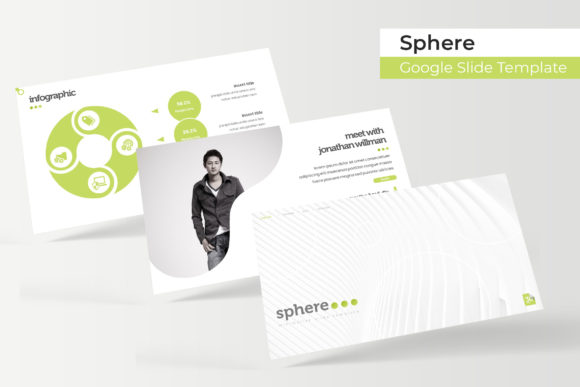
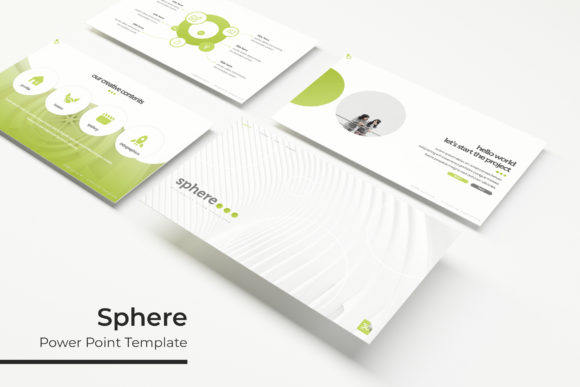
At its core, Sphere presents a clean, modern aesthetic defined by its distinctive circular motifs and balanced layouts. The design philosophy prioritizes clarity, ensuring your data and key points are never lost in visual noise. What makes it immediately appealing is its structured versatility. The package provides 150+ total slides, strategically divided across 5 premade color themes, with 30 unique slides for each template. This means you can switch the entire mood of your presentation—from corporate blue to energetic orange—with a single click, maintaining perfect color consistency throughout. The inclusion of handcrafted infographics and section break slides adds a layer of professional polish, allowing you to visualize complex information and guide your audience through a logical flow effortlessly.
For the practical creator, the template’s functionality is as important as its beauty. Every element is resizable and editable, built upon a Master Slides foundation. This architectural choice is crucial. It means you can customize fonts, colors, and layouts globally without breaking the design. The drag & drop picture placeholders simplify adding your own visuals, while the pixel-perfect illustrations ensure every slide looks sharp on any screen. Whether you're preparing a client pitch, an internal report, or a keynote address, this level of control saves hours of formatting frustration.
From Boardrooms to Brand Launches: Practical Applications
The true test of a design asset is its real-world application. Sphere’s versatility makes it a valuable tool across numerous professional scenarios. For brand identity projects, its consistent color system and modern typography help maintain visual coherence from the first slide to the last. Marketing teams will find it invaluable for creating social media graphics that stand out, or for developing marketing assets like campaign decks and webinar visuals that need to impress stakeholders.
Small business owners and entrepreneurs can leverage it to craft compelling pitches for investors, design professional packaging design mockups, or create digital products like online course modules. The clean layouts are also perfect for editorial design, allowing you to present articles, blog content, or magazine-style features in a slideshow format. Even for internal use, such as training manuals or quarterly reviews, the template elevates the perceived professionalism of the content, fostering better audience engagement and brand recognition.
Making It Your Own: Customization and Considerations
While Sphere provides a stunning starting point, its power lies in its adaptability. A key piece of practical advice is to start with the color theme that best aligns with your existing brand palette. From there, use the Master Slides to input your brand fonts and logos, creating a customized template you can reuse indefinitely. This ensures visual consistency across all your presentations, strengthening your professional image.
When customizing, pay close attention to readability considerations. The template uses a clean sans-serif font ideal for on-screen viewing, but if you're presenting in a large room, you may want to increase text sizes slightly. The gallery and portfolio slides are particularly useful for creative professionals—photographers, designers, or architects can showcase their work with impactful, full-bleed imagery. Remember, the included photographs are for preview only; you'll need to add your own visuals, which the intuitive placeholders make simple.
What's Inside the Box and Getting Started
Understanding the package helps you utilize it fully. You receive 5 PPTX files in a widescreen (16:9) format, each corresponding to one of the five color variations. The inclusion of a Readme First file is a thoughtful touch, guiding you through setup. A significant benefit is the free font download link included. The typeface used is a modern sans-serif that complements the template's geometric style, ensuring you can replicate the preview's look exactly. Always check the font's license for your specific commercial use, though it's provided for this purpose.
For those integrating Sphere into a broader design assets toolkit, think of it as a foundational layer. Pair it with a complementary display font for headlines in other projects, or use its color palette as a springboard for your web design or print materials. The goal is not to use the template in isolation, but to let its professional structure inform and elevate your overall visual communication strategy. By focusing on its strengths—structured layouts, easy customization, and cohesive design—you can turn any presentation into a powerful tool for storytelling and persuasion.