Streamline Your Next Pitch with the Probo Presentation System
Building a slide deck from scratch is often the most time-consuming part of preparing for a keynote, a client pitch, or a quarterly review. You spend hours adjusting text boxes, aligning images, and trying to make your data look "professional" rather than cluttered. For designers, small business owners, and content creators, this repetitive labor pulls you away from the actual creative work. This is where a robust design asset like the Probo Google Slide Template changes the workflow. It is not just a collection of pretty slides; it is a comprehensive presentation system designed to help you communicate your brand story with clarity and visual impact.
A Visual System Built for Modern Branding
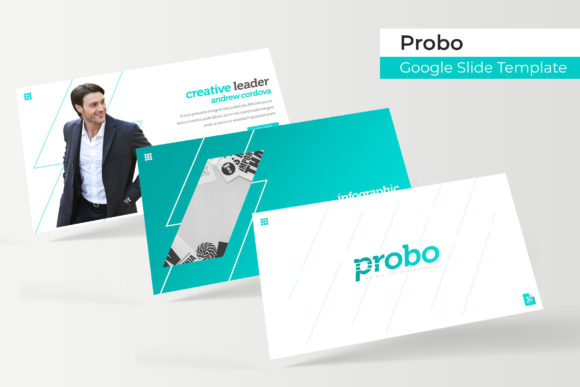
What sets the Probo template apart from the thousands of generic options available online is its commitment to visual consistency and scalability. The package includes 150+ total slides, but the structure is what makes it truly useful. It is built around 5 premade color palettes, offering 30 distinct slides for each variation. This allows you to instantly match the presentation to your existing brand identity without fiddling with color hex codes or gradient settings. Whether your brand leans toward corporate minimalism or vibrant creativity, the color variations provide a ready-made foundation that ensures your visual communication remains on-brand throughout the entire pitch.
The design language of Probo relies on pixel-perfect illustrations and a modern aesthetic. It avoids the dated clip-art look of older templates, focusing instead on clean lines and ample white space. This makes it an ideal choice for logo design presentations, brand identity guides, or editorial layouts. Because the graphics are handcrafted, they feel curated rather than generic, which helps establish credibility with your audience. When you are presenting a high-stakes marketing strategy or a new product launch, the quality of your visuals signals the quality of your work.
Practical Applications: From Pitch Decks to Social Media
While the primary function is a presentation, the versatility of the Probo system extends far beyond the boardroom. The resizable and editable graphic picture placeholders allow for a "drag & drop" experience that is intuitive even for those who aren't design experts. For social media managers, individual slides can be exported as high-quality images to create cohesive Instagram carousels or LinkedIn content. A single "Section Break Slide" can be repurposed as a striking banner for a blog post or a header for a newsletter, maintaining visual consistency across your digital ecosystem.
For those involved in packaging design or product development, the template includes Gallery and Portfolio slides. These layouts are specifically optimized to showcase high-resolution imagery without overwhelming the viewer. If you are a photographer, architect, or crafter, you can use these sections to display your work in a grid or masonry layout that flows naturally. The inclusion of handcrafted infographics is particularly valuable for marketers who need to explain complex data. Instead of relying on basic pie charts, these infographics allow you to visualize workflows, timelines, and statistics in a way that enhances audience engagement and retention.
Technical Efficiency and Workflow Integration
One of the most common frustrations with design assets is compatibility. The Probo template is built based on Master Slides, which is a critical feature for maintaining structure. If you need to change a font style or adjust a layout element across all 30 slides within a color set, you can do so from the master view, saving hours of manual editing. This "set it and forget it" approach to layout management is essential for busy entrepreneurs who need to update decks quickly before a meeting.
The package is delivered as 5 PPTX Files (Widescreen format), ensuring that it works seamlessly with both PowerPoint and Google Slides. The designers have also addressed a common pain point regarding typography by including a Readme First file with links to download the free fonts used in the design. This ensures that the text renders correctly and maintains the intended aesthetic, whether you are presenting on a large projector screen or a laptop. It is a small detail, but it demonstrates a focus on the user experience that separates premium assets from amateur downloads.
Maximizing Impact with Smart Typography
While the template handles the layout, the success of your presentation still relies heavily on how you communicate your message. The Probo system is designed to support strong typography practices. When customizing your deck, consider the hierarchy of information. Use the bold, modern headers provided to grab attention, but ensure your body text is optimized for readability. Avoid the temptation to crowd slides with too much text; let the white space do the heavy lifting to keep the audience focused on your key points.
For those using this for marketing assets or digital products, think about how the font pairings within the template can enhance your brand voice. If you are creating a proposal for a luxury client, the clean sans-serif options offer sophistication. If you are pitching a creative campaign, the layout allows for dynamic text placement that mimics editorial design. By aligning the template's visual style with your project goals, you transform a generic slide deck into a powerful tool for brand recognition and persuasion. Ultimately, the Probo Google Slide Template is about removing the technical barriers to design, allowing you to focus entirely on telling your story.