Streamline Your Next Presentation with Desgar's Dynamic Framework
There is a specific kind of frustration that hits when you open a blank presentation slide at 10 PM. You have the content ready, the data is solid, and the narrative is clear, but the visual execution feels impossible. We have all been there—staring at a white canvas, trying to align text boxes, hunting for color codes, and struggling to make a simple bar chart look professional. For entrepreneurs, marketers, and creatives, this isn't just annoying; it is a massive time sink. This is precisely why a structured approach to slide design, like the one found in the Desgar Keynote Template, is less of a luxury and more of a necessity for anyone serious about visual communication.
Beyond the "Default" Look: Why Structure Matters in Modern Typography
When we talk about modern typography and design assets, we are usually referring to fonts. However, the principles of good typography—hierarchy, spacing, and readability—apply directly to presentation layouts. A well-designed template acts as a skeleton for your content. It ensures that your headers command attention while your body text remains legible from the back of a conference room.
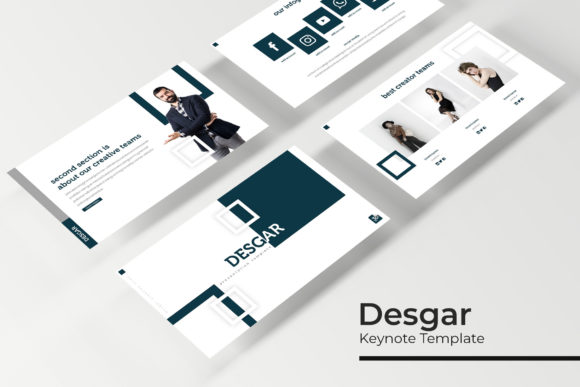
The Desgar Keynote Template functions much like a premium font family; it provides a cohesive system. Instead of a single typeface, you get a comprehensive architecture of 150+ total slides. This variety is crucial for maintaining audience engagement. Nothing kills a pitch faster than repetitive slide layouts. By cycling through different structures—quotes, data visualizations, timelines, and image grids—you keep the viewer’s brain active and interested.
The Psychology of Color in Brand Identity
One of the standout features of this collection is the inclusion of five premade color palettes. If you have ever tried to create a brand identity from scratch, you know that color theory is tricky. It’s not just about picking colors you like; it’s about picking colors that evoke the right emotion and ensure accessibility.
Having five distinct variations allows you to tailor your presentation to the specific psychological needs of your project:
- Corporate/Trust: Often leaning into blues and deep navies, perfect for investor decks or B2B proposals.
- Creative/Energetic: Usually featuring vibrant contrasts, ideal for marketing pitches or design portfolios.
- Minimalist/Modern: Utilizing monochromes or muted tones, great for editorial design presentations or high-end product launches.
These aren't just random colors splashed on a slide; they are integrated into the infographics and master slides. This ensures that when you change a theme, the charts, icons, and text placeholders update automatically. This level of automation is a game-changer for small business owners who need to look polished without hiring a dedicated design team.
Practical Applications: From Pitch Decks to Portfolios
The versatility of a template with 30 slides per color variation cannot be overstated. It is a multi-tool for visual communication. Let’s look at how different professionals can leverage this specific asset.
For the Marketing Professional
You are likely juggling multiple campaigns. You need to present a social media graphics strategy one day and a quarterly ROI report the next. The Desgar Keynote Template includes section break slides and gallery layouts that are perfect for showcasing packaging design or web design mockups. The "drag & drop" picture placeholders mean you can swap out stock photos for your actual campaign assets in seconds, maintaining the flow of your workflow.
For the Creative Entrepreneur
If you are a photographer, interior designer, or crafter, your presentation is your portfolio. The pixel-perfect illustrations and gallery slides provided in the package allow you to let your work speak for itself. Instead of fighting with alignment, you can focus on curating the best images of your merchandise or logo design projects. The widescreen format is standard for modern displays, ensuring your work looks cinematic and professional.
For the Educator and Blogger
Content isn't just written anymore. Content creators often repurpose blog posts into slide decks for platforms like SlideShare or LinkedIn. By using a structured template, you can break down complex topics into digestible chunks. The included infographics are particularly useful here; turning dry statistics into visual stories increases retention and shareability.
Technical Agility: Master Slides and Scalability
Let’s talk about the "engine" under the hood. The mention of "Master Slides" is significant for anyone who has suffered through inconsistent formatting. Master slides act as the control center. If you decide halfway through your presentation that the font size needs to be larger, or the logo needs to move to the right, you change it once on the master slide, and it updates across the entire deck.
Furthermore, the "Resizable and Editable Graphic" feature speaks to the reality of modern digital assets. We live in a multi-platform world. You might present on a projector, share a PDF on a tablet, or post individual slides to Instagram. Being able to resize elements without losing quality (vector capabilities) ensures your brand identity remains consistent across all mediums. Whether you are creating print materials or digital reports, the assets adapt to you.
Integrating Typography and Visual Hierarchy
A key component of the "Readme" file included with such packages is usually the font used. While the template provides the layout, the typography provides the voice. When you download a professional template, pay close attention to the free font download link usually provided.
Using the recommended font pairing is often the safest bet for readability. However, as a designer or brand strategist, you might want to swap these out to match your existing typeface library. The key is to maintain hierarchy. If you use a heavy display font for your headers, pair it with a clean sans serif font for the body text to avoid visual fatigue. The layout of the Desgar slides is designed to accommodate this interplay between heavy headlines and lighter body copy.
Making the Asset Work for You
Downloading the file is just the first step. To get the most out of a tool like this, you need to approach it with a strategy. Here is a practical workflow for implementing the Desgar Keynote Template into your next project:
- Audit Your Content First: Before opening the file, outline your narrative. Do you need to show a process? A comparison? A portfolio? Match your content needs to the specific slides provided in the 150+ collection.
- Customize the Color Palette: Don't just stick to the five premade options if they don't fit. Use the eyedropper tool to match the slides to your specific brand hex codes. The structure is already there; you just need to apply your skin.
- Test Your Pairings: If you decide to use your own premium font rather than the one included, test it on a data-heavy slide. Ensure the numbers are legible and the text doesn't overflow the placeholders.
- Optimize Your Images: Since the template supports drag & drop, ensure your source images are high-resolution. A pixel-perfect layout can be ruined by a blurry product photo.
The Value of "Done-For-You" Design
There is a misconception among some hobbyists and startups that using a template is "cheating." In the professional world, this is rarely the case. Time is money. If a template allows a freelance designer to deliver a pitch deck in 4 hours instead of 14 hours, that is smart business. It frees up cognitive space to focus on the message, the strategy, and the client relationship, rather than pixel-pushing.
The inclusion of handcrafted infographics is particularly valuable here. Creating a custom flowchart or statistical graph from scratch in PowerPoint or Keynote is notoriously tedious. Having a library of pre-animated, editable charts allows you to present data with the same polish as a Fortune 500 company, regardless of your team size.
Final Thoughts on Visual Consistency
Ultimately, the goal of any design asset is to reduce noise and amplify clarity. Whether you are designing an invitation for a high-end event or a marketing asset for a product launch, consistency builds trust. When your slides flow seamlessly, when your colors are harmonized, and when your typography is legible, your audience focuses on your ideas, not your formatting errors.
The Desgar Keynote Template offers a robust foundation for this kind of professional communication. It bridges the gap between raw data and visual storytelling, providing a toolkit that adapts to various industries—from packaging design presentations to corporate financial reviews. By leveraging these pre-built structures, you ensure that every time you hit "present," you are putting your best visual foot forward.