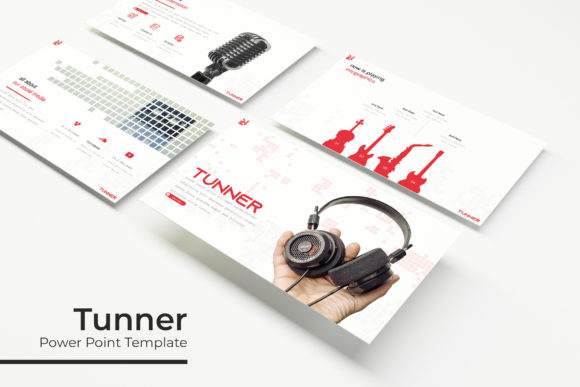
Unlock Professional Presentations with the Tunner PowerPoint Template
Imagine walking into a client meeting or pitching a new idea to stakeholders. You open your presentation, and instead of the usual generic slides, you display a polished, visually cohesive deck that immediately captures attention. That’s the promise of the Tunner PowerPoint Template—a versatile, feature-rich tool designed for professionals who need to communicate ideas with clarity and style. With over 150 slides, five premade color schemes, and a suite of customization options, this template goes beyond basic formatting to help you build presentations that truly resonate.
A Closer Look at What Makes Tunner Stand Out
At its core, Tunner is built for efficiency and visual impact. Each of the five color variations includes 30 thoughtfully designed slides, giving you a total of 150+ options to mix and match. Whether you’re preparing a business report, a marketing proposal, or a creative portfolio, the variety ensures you won’t run out of layouts. The slides are pixel-perfect, meaning every element is aligned and sized precisely—no more fiddling with misaligned text boxes or uneven margins. Handcrafted infographics break down complex data into digestible visuals, while section break slides help organize your narrative flow.
One of the standout features is the drag-and-drop picture placeholder system. Instead of struggling to fit images into rigid frames, you can simply drag your photos into designated areas, and they’ll automatically resize and crop to fit. This saves time and maintains a clean, professional look. Since everything is based on master slides, making global changes—like updating fonts or color accents—takes just a few clicks. You won’t have to edit each slide individually, which is a huge time-saver for anyone working under tight deadlines.
Practical Uses Across Industries and Projects
While presentations are the obvious use case, the Tunner template’s flexibility extends into many other areas. For small business owners, it can serve as a foundation for creating branded materials. Use the slides to design pitch decks for investors, internal training manuals, or even social media content. The consistent color themes and layouts make it easy to maintain brand recognition across different platforms.
Designers and content creators will appreciate the template’s adaptability. The infographic slides are perfect for explaining processes or statistics in blog posts or YouTube videos. Portfolio slides allow you to showcase work in a structured, visually appealing way—ideal for freelancers looking to impress potential clients. If you’re involved in packaging design or editorial layouts, the clean typography and balanced compositions can inspire real-world print materials. The resizable graphics mean you can adapt elements for posters, merchandise mockups, or digital product listings without losing quality.
Marketers can leverage the template for campaign planning, performance reports, or webinar slides. The visual consistency helps reinforce brand identity, while the professional polish enhances credibility. Even hobbyists or educators can use Tunner for workshop materials, event invitations, or community presentations. Essentially, any project that requires clear communication and a refined aesthetic can benefit from this toolkit.
Enhancing Your Workflow and Brand Consistency
One of the biggest challenges in design is maintaining consistency across multiple assets. Tunner addresses this by providing a cohesive system. The five premade colors are carefully selected to work together, ensuring that your slides look harmonious whether you use one theme or mix elements from different variations. This consistency extends to typography—while the template doesn’t include fonts, it uses free, widely available typefaces that you can easily download. This means your presentation will look the same on any device, avoiding the common issue of missing or substituted fonts.
For those focused on branding, the template acts as a starting point for developing a visual language. You can customize the master slides to match your brand’s colors, logos, and fonts, creating a reusable framework for all future presentations. Over time, this builds recognition—your audience will start associating certain colors and layouts with your business. The handcrafted infographics also help in storytelling, turning dry data into engaging narratives that keep viewers interested.
From a practical standpoint, the drag-and-drop functionality reduces the learning curve for those less familiar with PowerPoint. You don’t need advanced design skills to create professional-looking slides. The intuitive layout encourages experimentation, allowing you to test different arrangements and visual hierarchies. This is especially useful for entrepreneurs or small teams who may not have dedicated design resources but still want to present ideas effectively.
Tips for Getting the Most Out of Your Template
To maximize the value of Tunner, start by planning your content structure before diving into design. Outline the key points you want to cover and match them to appropriate slide types—use infographics for data, section breaks for transitions, and portfolio slides for showcasing work. This strategic approach ensures your presentation flows logically and holds attention.
When selecting color variations, consider your audience and context. Bright, bold colors might work well for creative pitches, while subdued tones could be better for corporate reports. Don’t feel limited to using just one theme; you can combine slides from different color sets if needed, but stick to a consistent palette to avoid visual clutter.
Pay attention to font pairings and readability. The template uses clean, modern typefaces, but if you decide to customize, choose fonts that complement each other—one for headings and another for body text. Test your slides on different screens to ensure text remains legible, especially if you’re presenting in large rooms or sharing digitally. Remember, the goal is clarity, not just aesthetics.
Finally, leverage the included assets wisely. The readme file provides guidance on setup and font downloads, so review it first. Since photographs in the preview are for illustration only, source your own high-quality images to maintain originality. Use the resizable graphics to adapt visuals for different formats, whether it’s a widescreen presentation or a printed handout.
Why This Template Fits Modern Design Needs
In a world where visual communication is paramount, having reliable design assets saves time and elevates your work. The Tunner PowerPoint Template isn’t just about pretty slides—it’s about creating a seamless experience for both the presenter and the audience. The attention to detail, from pixel-perfect illustrations to editable graphics, reflects an understanding of real-world design challenges. It’s a tool that grows with your projects, whether you’re building a brand from scratch or refining an existing identity.
For anyone involved in marketing, education, or creative fields, this template offers a practical balance of structure and flexibility. It empowers you to focus on your message rather than getting bogged down by formatting issues. By incorporating Tunner into your workflow, you’re not just buying a set of slides—you’re investing in a more efficient, professional way to communicate ideas. And in today’s competitive landscape, that can make all the difference.