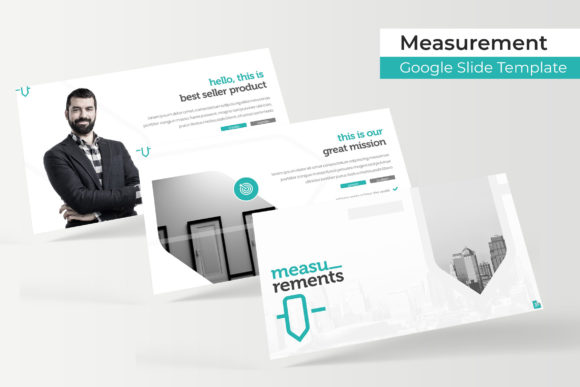
Mastering Presentations with the Measurement Template
Crafting a presentation that holds attention from the first slide to the last is a challenge every professional faces. We’ve all sat through decks that feel disjointed, where inconsistent design distracts from the core message. The difference between a forgettable slideshow and a persuasive, professional presentation often boils down to the visual framework holding it all together. This is where a thoughtfully constructed template system becomes an indispensable asset, transforming a chaotic collection of ideas into a cohesive visual story.
A Foundation for Visual Consistency and Brand Recognition
The Measurement Google Slide Template is built on the principle of structured flexibility. At its core are 150+ total slides, meticulously organized into five premade color themes. Each color variation contains 30 unique slides, providing a complete and consistent visual language for any brand or topic. This isn't just about having multiple slides; it's about ensuring that every chart, infographic, and text block shares the same design DNA. When you use this system, your audience subconsciously registers the uniformity, which builds trust and reinforces your brand identity without a single word.
For a small business owner or a marketing professional, this consistency is gold. Imagine preparing a quarterly report. With the Measurement template, your data slides, team bios, and project timelines will all use the same custom color palette, the same illustrative style, and the same typographic hierarchy. This eliminates the last-minute scramble to "make things match" and ensures your presentation looks as polished as your strategic thinking. The handcrafted infographics are particularly valuable here, turning complex data into digestible, on-brand visual assets that enhance comprehension and retention.
Beyond the Slideshow: A Versatile Design Asset
While its primary function is for presentations, the true power of a resource like the Measurement template lies in its adaptability as a design asset. The included PPTX files are fully editable in PowerPoint, and their components can be repurposed for a wide array of creative projects, extending your investment far beyond the boardroom.
- Social Media Graphics & Digital Marketing: Use the gallery and portfolio slides as a starting point for Instagram carousels or LinkedIn infographic posts. The pixel-perfect illustrations and editable graphics can be exported and adapted for banners, ads, or email headers, maintaining a unified look across all digital touchpoints.
- Print Materials and Brand Collateral: The clean, scalable vector elements are ideal for designing one-page sales sheets, workshop handouts, or even event posters. By locking in your brand's color theme from the five options, you can create print-ready materials that feel directly connected to your slide presentations.
- Internal Documents and Proposals: Elevate internal communications. Use the structured layouts for project proposals, training manuals, or strategic plans. The professional framework lends credibility to internal documents, making routine paperwork feel more intentional and valuable.
- Digital Product Mockups: For creators selling digital goods, the portfolio slides offer a clean backdrop for showcasing e-book covers, course modules, or app interfaces. The resizable and editable graphic placeholders make it simple to drag and drop your own product images into a pre-designed, visually appealing scene.
Practical Workflow and Customization
A template should save time, not create new headaches. The Measurement system is designed with a practical workflow in mind. Being based on Master Slides, any global change—like updating your brand's primary color or adjusting the font—can be applied once and reflected across all 150+ slides instantly. This feature alone can cut design revision time in half.
The drag-and-drop picture placeholders are another significant efficiency booster. Instead of manually resizing and cropping images to fit awkward frames, you simply drag your photo onto the placeholder, and it snaps into the perfect position and proportion. This is especially useful for creating consistent team pages or product galleries where uniformity is key.
For those concerned about typography, the readme file included with the download details the free fonts used in the design. This is a critical step for maintaining the template's intended aesthetic. Before starting, download and install these fonts to ensure everything renders correctly. If you need to align with an existing brand kit, you can easily swap these fonts for your own corporate typefaces in the master slides. Remember to test font pairings within the template's layouts; a clean sans-serif for body text often pairs well with a more distinct display font for headings, ensuring both readability and visual impact.
Choosing a System, Not Just a Template
Selecting a presentation template is a decision that affects your project's clarity and professionalism. The value of the Measurement Google Slide Template lies in its systematic approach. It provides a robust toolkit—five color variations, a vast library of layouts, and editable infographics—that empowers you to build presentations that are not only beautiful but also strategically organized.
Whether you're a designer building a brand identity system for a client, an entrepreneur pitching to investors, or a content creator developing a webinar, having a reliable visual framework removes guesswork. It allows you to focus your energy on your message, confident that the visual container is working just as hard to communicate your professionalism and attention to detail. The result is a more engaging audience experience and a stronger, more recognizable brand presence across every slide you create.